 RefreshRank
WordPress Revisions: The Safety Net for Content Updates
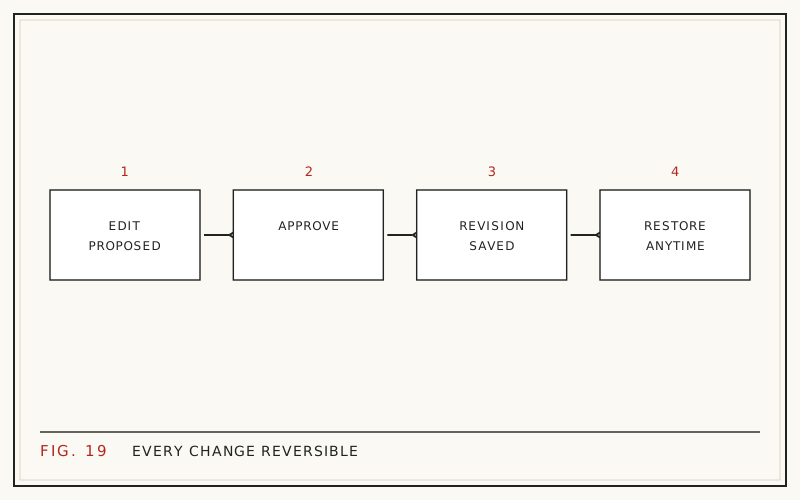
Every time you click Update on a published WordPress post, WordPress saves a full copy of the version you just replaced. That saved copy is a revision, and it makes almost any content change reversible in one click. If you refresh old posts regularly - new titles, rewritten intros, corrected stats - revisions are the reason a bad edit is never permanent.
This guide explains how revisions actually work: where they live in the database, what they capture and what they miss, how the restore flow behaves, and how to control storage with WP_POST_REVISIONS. It also covers why any tool that edits content on your behalf should write its changes as revisions too.
What exactly is a WordPress revision?
A revision is a snapshot of a post's title, content, and excerpt at the moment you saved it. WordPress has created revisions automatically since version 2.6, released in 2008, and they are enabled by default for posts and pages.
Two events create one. Every manual save is the big one: when you click Update or Publish, WordPress stores the outgoing version as a revision before the new version replaces it. Autosaves are the second event, and they behave differently, which we cover below.
A revision is not a site backup. It holds no images, comments, plugin data, or settings. It protects exactly one thing - the editorial content of a single post - and it does that narrow job reliably.
Where revisions live: the wp_posts table
Revisions are ordinary rows in wp_posts, the same database table that stores your published posts and pages. Three columns identify them:
- post_type is set to revision instead of post or page
- post_status is set to inherit
- post_parent holds the ID of the post the revision belongs to
Because revisions share the posts table, a frequently edited article can leave dozens of extra rows behind. WordPress excludes revision rows from front-end queries, so visitors and search engines never see them. They only affect table size, which is why the revision limit setting exists in the first place.
What a revision captures - and what it misses
A core revision stores three fields: post_title, post_content, and post_excerpt. That covers most of what changes in a typical refresh - the headline, the body, an answer-first intro, an FAQ block added inside the content.
It does not cover everything. Featured images, categories, tags, and most custom fields are not revisioned by default. The notable gap is SEO plugin data: if your meta description lives in a postmeta field written by an SEO plugin, restoring a revision will not bring the old value back. Copy the old meta description somewhere safe before overwriting one you might want again.
How the restore flow works
Restoring takes under a minute and does not touch your publish date.
- Open the post in the editor and find the Revisions count in the settings sidebar
- Click it to open the comparison screen, then drag the slider back to any earlier version
- Deletions show highlighted on one side, additions on the other, field by field
- Click the Restore This Revision button to make that version the live content
One detail worth knowing: restoring is itself a save, so WordPress records the version you just abandoned as a new revision. You can restore a restore. Nothing in the flow ever discards history.
Autosaves are not revisions
While you edit, WordPress autosaves your work every 60 seconds. An autosave looks like a revision in the database, but there is only ever one per user per post, and each new autosave overwrites the last. Its job is crash recovery - the restore-the-backup notice you see after a browser dies - not version history.
Manual saves are what build the permanent trail. That is a practical argument for clicking Update at sensible checkpoints during a long editing session instead of saving once at the end: each checkpoint becomes a version you can compare against or return to later.
Controlling storage with WP_POST_REVISIONS
By default WordPress keeps every revision forever. The WP_POST_REVISIONS constant in wp-config.php changes that:
| Value | Effect |
|---|---|
| true (the default) | Keep unlimited revisions per post |
A number, e.g. define('WP_POST_REVISIONS', 20); | Keep the newest 20 per post, deleting older ones |
| false or 0 | Disable revisions entirely, keeping only autosaves |
For sites that refresh content, disabling revisions is the one setting to avoid - it removes your rollback path completely. A limit of 10 to 25 keeps useful recent history while capping table growth. Add the line above the stop-editing comment in wp-config.php.
Do revisions slow WordPress down?
For most sites, no. Revision rows sit in wp_posts but are filtered out of normal queries, so they do not slow page loads for visitors. Where they show up is database size: backups get larger, and some admin-side queries get slightly heavier once tables hold tens of thousands of rows.
If cleanup is genuinely needed, set a WP_POST_REVISIONS limit and remove existing old rows with WP-CLI or a reputable database cleanup plugin, after taking a backup. Do it for backup hygiene, not because you expect a speed win - deleting revisions is not a performance strategy, and anyone selling it as one is overselling.
Why revisions matter when you refresh old posts
Refreshing old content is one of the better-documented wins in SEO. HubSpot's historical optimization program increased monthly organic search views of updated posts by an average of 106%, and old posts drove 76% of the blog's monthly views (HubSpot, 2015 analysis, updated 2025). In Semrush's State of Content Marketing survey, 42% of marketers said updating and repurposing existing content led to content marketing success (Semrush, 2023).
Every one of those updates is also a small risk: a rewritten intro can land worse, a new title can drop CTR. Revisions turn that risk into a cheap experiment. Change the page, watch Search Console, and if the edit backfires, roll back and try a different angle. That loop is the core of a sane refresh practice - see our step-by-step guide to refreshing old blog posts and how to measure refresh results.
How RefreshRank uses revisions
This safety net is why RefreshRank applies every accepted change as a standard WordPress revision. The plugin drafts scoped edits - title, meta description, intro, FAQ, date updates - and shows each one as a current-versus-proposed diff. Nothing publishes until a human approves it, and once applied, the previous version sits one click away in the normal revisions screen.
There is no custom rollback system to learn and no lock-in: it is the same wp_posts mechanism described above. The free plugin is on wordpress.org, and the rewrites documentation lists exactly which fields each task touches.
A safe workflow for your next content update
Before your next batch of updates, make revisions part of the routine:
- Confirm WP_POST_REVISIONS is not disabled on the site
- Click Update at meaningful checkpoints, not just once at the end
- Copy SEO plugin fields such as the meta description into a note first, since postmeta is not rolled back with the content
- Record the date of each refresh so you can compare before and after in Search Console
- If you also change visible dates, do it honestly - see updating dates without faking freshness
With that in place, no single edit can cost you more than the minute it takes to restore.
Questions
How many revisions does WordPress keep by default?
All of them. Unless WP_POST_REVISIONS is defined in wp-config.php, WordPress stores every manual save of every post indefinitely. A post edited weekly for two years can carry a hundred revisions. If that bothers you, set a numeric limit such as 20 - but do not disable revisions entirely, because that removes your rollback path for future content updates.
Do WordPress revisions affect SEO?
No. Revisions are never publicly visible, have no URLs of their own, and are excluded from front-end queries and sitemaps, so search engines cannot index them. Their only cost is database rows. Indirectly they help SEO, because they make it safe to test title, intro, and content changes and roll back anything that performs worse.
Does restoring a revision change the publish date?
No. Restoring replaces only the title, content, and excerpt; the original publish date and slug stay as they were. The modified date does update, since a restore is a save. If you want the visible date on the page to change, that is a separate, deliberate edit - and it should reflect a genuine content update.
Do revisions work for pages and custom post types?
Posts and pages get revisions by default. Custom post types only get them if the developer declared revisions support when registering the type, so check before assuming a rollback exists. If a plugin's custom type lacks support, edits there are permanent in a way blog post edits are not - a reason to keep important editorial content in standard posts.
Do revisions save my SEO plugin's meta description?
Usually not. Core revisions cover post_title, post_content, and post_excerpt. Meta descriptions written by SEO plugins live in postmeta, which core does not revision by default. Before overwriting a meta description that currently performs well, copy the old value somewhere recoverable. Some SEO plugins add their own history features, but do not count on it.
How do I delete old revisions safely?
Take a database backup first. Then either set a WP_POST_REVISIONS limit so WordPress trims future saves automatically, or remove existing rows with WP-CLI or a reputable database cleanup plugin. Keep at least the last handful per post. Deleting revisions is housekeeping for backup size, not a performance fix, so there is no urgency.
What happens to revisions when I delete a post?
They are removed with it. When a post is permanently deleted, WordPress deletes its revisions too, since they are child rows pointing at the parent post's ID. While the post sits in the trash you can still restore everything. After the trash is emptied, only a database or site backup can bring the content back.
Can revisions recover changes a plugin made to my posts?
Only if the plugin saved its changes through the normal WordPress save path, which writes a revision. Well-behaved editing tools do; RefreshRank, for example, applies every approved change as a standard revision precisely so rollback works from the stock revisions screen. If a plugin writes directly to the database instead, no revision exists and you are relying on backups.
Sources
- HubSpot - Optimizing the Past: Historical Blog SEO (2015, updated 2025)
- Semrush - State of Content Marketing, via Repurposing Content (2023)