 RefreshRank
How to Update Dates on Blog Posts Without Faking Freshness
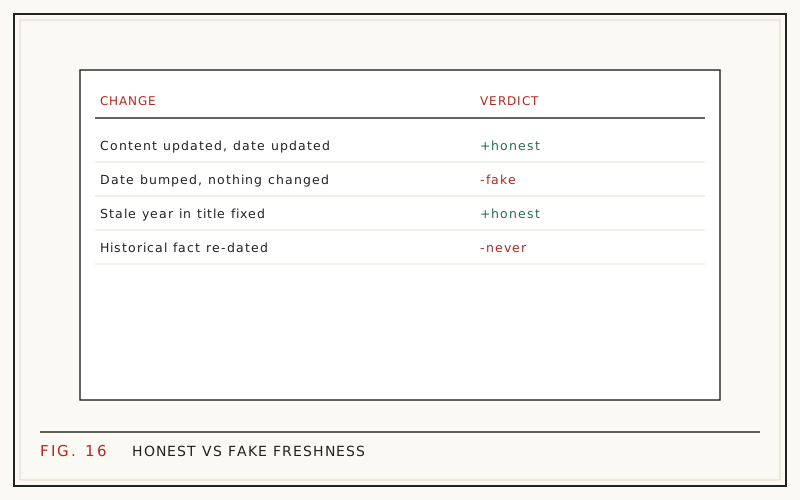
Change the date on a blog post only when you have genuinely changed the post. The honest pattern is simple: keep datePublished as the day the article first went live, update dateModified when you make real edits, and show readers both when the history matters. A new date with no new substance is fake freshness, and Google has spent years learning to discount it.
Dates are not decoration. Google's 2011 freshness update affected roughly 35% of searches, according to the company's announcement as quoted by Search Engine Land (2011), and the date next to your snippet still shapes whether people click. That pressure tempts site owners to bump dates on autopilot.
This guide covers what each date field actually claims, when a date change is honest, and how to handle both dates cleanly in WordPress.
datePublished vs dateModified: two different claims
The two fields answer two different questions. datePublished says: this is when the article first appeared. dateModified says: this is the last time someone made a meaningful change to it. Both live in your page's Article structured data, and WordPress stores both in the database, as post_date and post_modified.
Treat them as promises to the reader. A tutorial published in 2022 and substantially revised last month is honestly described by both dates together. Overwriting the original publish date with last month's date erases the article's history and claims it was written from scratch, which it was not.
Keep datePublished stable for the life of the URL. Let dateModified move, and only when the content moved with it.
Which date does Google show in search results?
Google decides which date to display, not you. It reads the visible byline date, the structured data, and other signals, then shows the date it trusts most. When your visible date says one thing and your schema says another, Google may pick either, or drop the date entirely.
The practical rule is consistency. Make the date readers see on the page match the dateModified in your structured data, and keep your XML sitemap's lastmod in agreement too. Mismatched signals are the most common reason a genuinely fresh update keeps showing an old date in the results.
If your snippets are already showing dates from years ago, that alone costs clicks. We cover that failure mode in stale dates in search results.
When is a new date honest?
A date change is honest when a returning reader would notice the difference. Substantive edits earn a fresh dateModified:
- You rewrote the introduction to answer the query directly.
- You replaced outdated statistics, screenshots, or product references.
- You added new sections, examples, or an FAQ covering new questions.
- You corrected advice that no longer works.
- You removed or replaced dead links and obsolete steps.
Fixing a typo, tweaking a category, or swapping a featured image does not clear the bar. Those edits are fine; they just do not earn a visible new date. The full editing workflow, from choosing targets to publishing, is in our post refresh playbook.
What fake freshness looks like
Fake freshness is any attempt to look updated without being updated. The common patterns:
- Bumping the visible date or dateModified with zero content changes.
- Republishing an old post as new with a fresh datePublished.
- Mass-updating dates across an entire archive on a schedule.
- Hiding dates entirely so nobody can tell how old the content is.
Google's documentation tells publishers not to artificially freshen pages, and its systems can compare your claimed dates against crawl history. The likely outcome is not a penalty but quiet distrust: Google starts showing its own estimate of the date, or no date at all, and you lose control of your snippet.
Old pages rank fine, so do not panic re-date
Age by itself is not the problem. In Ahrefs' 2023 study of roughly two million URLs, the average page ranking number one in Google was five years old, and 72.9% of top-10 pages were more than three years past publication (Ahrefs, 2023). Mature pages with maintained content dominate competitive results.
That cuts against the instinct to make everything look new. What decays is accuracy and relevance, not the calendar date. A well-maintained 2021 URL with an honest updated label routinely beats a re-dated page whose content still says 2021 inside.
For the longer argument about when freshness actually matters to rankings, see is content freshness a ranking factor.
How WordPress handles the two dates
WordPress updates post_modified automatically every time you click Update, including for a one-character typo fix. That is worth knowing, because if your theme displays the modified date, trivial edits will silently re-date the post in readers' eyes.
Most themes display only the published date by default. To show the modified date, you either use a theme that supports it, add a small template change, or install a plugin that outputs it. Whichever route you take, make sure both dates appear in the page's Article schema, which most SEO plugins already handle.
One caution: do not manually edit post_date to a newer day just to re-sort your blog index. That is the fake-freshness pattern wearing a CMS costume.
Show both dates when the history matters
For evergreen tutorials and guides, the strongest pattern is transparent: 'Published March 2023 - Updated August 2026'. Readers get the article's full history, and Google gets consistent signals about which date is which.
Freshness visibility is also becoming an answer-engine question, not just a search-results question. Ahrefs found that URLs cited by AI assistants are on average 25.7% fresher than the organic results for the same queries (Ahrefs, 2026). An accurate, recent dateModified, backed by genuinely current content, is part of how your page proves it is still the best answer.
For opinion pieces, announcements, and event recaps, keep the published date front and center. Those pages are records of a moment, and re-dating them misleads.
A quick decision table
Match the date action to the size of the edit:
| What you changed | Date action |
|---|---|
| Typo, formatting, image swap | No visible date change |
| Refreshed stats, links, screenshots | Update dateModified, show an updated label |
| Rewrote intro, added sections or FAQ | Update dateModified, summarize the changes |
| Complete rewrite, same topic and URL | Update dateModified, consider a change note |
| New angle or new topic | Publish a new post instead |
When in doubt, ask whether you would feel comfortable explaining the new date to a reader who saved the old version. If the answer is no, the content has not changed enough yet.
Leave historical facts alone
An honest update changes what is current without rewriting what happened. A case study that ran in 2019 stays a 2019 case study. Survey numbers keep their fieldwork year even after you add newer figures alongside them. 'As of' statements keep their original dates unless you have re-verified the claim.
This is where automated rewriting can go wrong, so it is a deliberate constraint in RefreshRank: its date-update task proposes a new dateModified only as part of a real refresh, shows every edit as a current-vs-proposed diff a human approves, and leaves historical facts as they are. Applied changes land as standard WordPress revisions, so one click rolls anything back.
Check whether the new date earned anything
After an honest re-date, measure it like any other refresh. Note the day the update went live, wait for reindexing, then compare the 28 days after against the 28 days before in Google Search Console. A corrected snippet date often shows up as a click-through improvement at roughly the same average position.
The step-by-step measurement workflow is in how to measure content refresh results. And if you want the detection side handled for you, the free RefreshRank plugin reads your own Search Console history in 28-day windows and surfaces the pages losing clicks, so date fixes ride along with refreshes that actually earn them.
Questions
Does changing the date on a post improve rankings?
Not by itself. A date change with no content change gives Google nothing new to evaluate, and mismatches between your claimed date and crawl history erode trust in your dates. What can move results is the update behind the date: better answers, current facts, and a title that matches today's queries. The date is a label for that work, not a substitute for it.
Should I ever change datePublished?
Almost never. datePublished records when the article first went live and should stay stable for the life of the URL. The rare exception is a true republication, where the piece is rewritten so completely that it is effectively a new article. Even then, many publishers keep the original date and rely on dateModified plus a change note instead.
Why does Google show a different date than my page displays?
Because Google chooses the date itself from your visible byline, structured data, sitemap lastmod, and its own crawl history. When those disagree, it picks the signal it trusts most, or omits the date. Fix it by making the on-page date, the dateModified in schema, and the sitemap entry all agree, then request reindexing.
Does WordPress update the modified date automatically?
Yes. Every save updates post_modified, even for a typo. If your theme displays the modified date, small edits will quietly re-date the post in readers' eyes, which is one reason to reserve visible updated labels for substantive revisions. Some plugins offer an option to save without touching the modified date for trivial fixes.
Should I just remove dates from my blog?
No. Hiding dates does not make content fresh; it makes readers suspicious and pushes Google to estimate a date without your input. For most informational queries, searchers actively prefer results with visible, credible dates. Show the date, and keep the content worth its date.
How much do I need to change to justify an updated label?
Enough that a returning reader notices. A rewritten intro, replaced statistics, new sections, or corrected steps all qualify. Typos and formatting do not. A reasonable internal bar: if you cannot write one sentence describing what changed and why it matters, do not surface a new date.
Should my sitemap's lastmod match dateModified?
Yes. Google has said it uses lastmod when it is consistently accurate, so it should reflect the last significant content change, the same event your dateModified records. Regenerating lastmod for every trivial save, or for the whole sitemap at once, trains Google to ignore it on your site.
Do updated dates matter for AI search answers?
They appear to. Ahrefs measured that URLs cited by AI assistants are on average 25.7% fresher than the organic results for the same queries (Ahrefs, 2026). An accurate dateModified, backed by genuinely current content, is one of the few freshness signals you fully control, so it is worth keeping honest.
Sources
- Search Engine Land - Google Search Algorithm Change For Freshness To Impact 35% Of Searches (2011)
- Ahrefs - How Long Does It Take to Rank in Google? (2023)
- Ahrefs - What Is Content Decay? (And How to Fix It) (2026)