 RefreshRank
How to Measure Content Refresh Results in Search Console
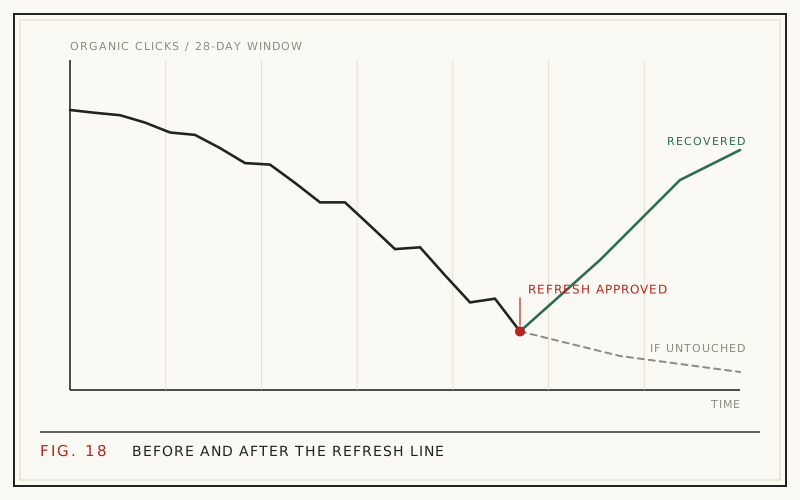
Measure a content refresh the same way you found the decay: record the exact date your changes went live, wait for Google to reindex and respond, then compare the 28 days after against the 28 days before in Google Search Console. Filter to the refreshed URL and read four numbers: clicks, impressions, CTR, and average position.
Refreshes are worth measuring because the upside is real. HubSpot's historical optimization program lifted organic search views of updated posts by an average of 106% (HubSpot, 2015, updated 2025). But averages hide variance - some refreshes triple traffic while others do nothing - and only per-page measurement tells you which parts of the playbook actually work on your site.
Why 28-day windows beat any other frame
A 28-day window is four complete weeks, which means every weekday appears exactly four times. Weekly traffic rhythm is strong on most sites - B2B posts sag on weekends, consumer topics often spike on them - so a 30- or 31-day window compares unequal weekday mixes and adds noise for no benefit.
Four weeks is also long enough to absorb one-day anomalies and short enough to isolate the refresh from unrelated drift. Usefully, it is the same frame that works for detecting decay in the first place, which keeps your before/after numbers directly comparable with the decline that justified the refresh.
Record the refresh date before you do anything else
Attribution starts with a log. The moment a refresh goes live, record three things: the URL, the date, and one line describing what changed - new title, rewritten intro, added FAQ, updated stats. A spreadsheet is enough.
Without this log, you will be guessing within a month. Search Console does not annotate your changes for you, and memory reliably fails across a dozen refreshed posts. With the log, every before/after comparison is anchored to a real date, and patterns emerge across refreshes: maybe title rewrites move CTR on your site while added FAQs mostly grow impressions.
Not sure what belongs on the change list? The scope of a standard pass is laid out in the refresh playbook.
Setting up the before/after comparison
The comparison takes about a minute per page:
- Open Search Console -> Performance -> Search results.
- Add a Page filter for the exact refreshed URL.
- Open the date selector -> Compare -> Custom range.
- Set the first range to the 28 days ending the day before the refresh.
- Set the second range to a 28-day window starting a few days after the refresh, so crawl lag does not dilute it.
- Read clicks, impressions, CTR, and position side by side, then open the Queries tab with the comparison still active.
Export each comparison into your log if you are tracking more than a handful of pages. The screenshots age; the numbers do not.
The four metrics and what each one answers
Read the metrics together, not alone:
| Metric | Question it answers | Good sign after a refresh |
|---|---|---|
| Clicks | Did we recover traffic? | Up vs the before window |
| Impressions | Are we shown for more queries? | Up, especially on new queries |
| CTR | Did the new title and meta earn more clicks? | Up at a similar position |
| Position | Does Google rank the page better? | Improved on target queries |
CTR up at the same position credits the title and meta rewrite. Impressions up with flat CTR often means new FAQ coverage is surfacing for extra queries at modest positions. Position improvements typically arrive last, because they require Google to re-evaluate the page against its competitors.
How long before you can judge the result
Expect three phases. Reindexing usually happens within days of the update, faster if you request indexing in the URL Inspection tool. Click-through changes from a new title and meta can appear within the first week or two, since they need no ranking change at all. Ranking movement is slowest and can take several weeks to settle.
Fast outliers exist. Backlinko's content relaunch case study reported a 260.7% organic traffic increase within 14 days, but that is a single documented page (Backlinko, 2016), not a planning assumption. A fair default: wait until one clean 28-day window has passed after reindexing, then judge.
What a win actually looks like
A successful refresh usually shows one of three fingerprints. The CTR win: clicks up meaningfully at nearly the same position, meaning the new title and meta are converting more of the impressions you already had. The relevance win: position improves on the page's core queries and clicks follow. The coverage win: impressions grow because new sections and FAQ answers match queries the page never appeared for before.
Partial wins count. A page that stopped declining and held flat after two years of steady decay is a result - the counterfactual was continued loss, not stability. Log the fingerprint next to each refresh, and over time you learn which levers actually move numbers on your site.
Reading a flat or negative result
A flat result after a full window is information, not failure. Check three things in order. First, confirm Google actually indexed the changes: inspect the URL and look at the last crawl date. Second, drop to query-level data, because clicks can be flat overall while the target queries improved and an irrelevant query faded. Third, reconsider the diagnosis: if the content was fine and the real problem was a lost backlink or a changed results-page format, a refresh was never the right tool.
Two clean failed refreshes on the same page are a signal to escalate from update to rewrite, or to retire the page. That framework is in update, rewrite, or delete.
Rule out confounds before claiming credit
Your refresh is not the only force moving the numbers. Google reported running over 700,000 search experiments in 2023, resulting in more than 4,000 launched changes (Google, 2023), and Search Engine Land counted 4 officially confirmed algorithm updates in 2025 alone (Search Engine Land, 2025). If a core update rolled out inside your after-window, treat the comparison as contaminated and re-measure a later window.
Seasonality is the second confound. If your after-window lands in a naturally stronger or weaker month for the topic, add a year-over-year check before crediting the refresh. The method for separating those patterns is in content decay vs seasonality.
Query-level wins the page view hides
Page totals blend everything; the Queries tab shows what actually changed. With the page filter and date comparison still active, sort queries by click change. Refreshes often shift the query mix: the new answer-first intro wins a better spot on one question while a tangential query fades away, netting out near zero at page level even though the refresh did its job.
Remember that average position is impression-weighted. Newly gained impressions on lower-ranking long-tail queries can drag the page's blended average down even while the core queries improve. That trap, and how to read around it, is unpacked in average position dropping.
Measuring the program, not just the page
Once you refresh at scale, aggregate. Track total clicks across all refreshed URLs, before vs after, plus a simple hit rate: the share of refreshes that improved clicks or CTR. A hit rate around half is genuinely good, because the wins tend to outweigh the flat results, and your change log tells you which edit types drive the rate up.
Tracking windows by hand across dozens of pages is where spreadsheets start to strain. RefreshRank keeps this timeline for you: it syncs up to 16 months of your own Search Console data daily, in the same 28-day windows, so each page's decay history and post-refresh trajectory sit in one place. The plugin's free plan covers one site with the full queue. And choosing which pages deserve a refresh first is its own discipline - see how to prioritize content updates.
Questions
How long should I wait after a refresh before judging results?
Wait for one clean 28-day window after Google has reindexed the page, which in practice means judging five to six weeks after publishing changes. CTR effects from a new title can show earlier; ranking effects settle later. Judging inside the first week mostly measures crawl lag, not the refresh.
Why did impressions go up but clicks stay flat?
The page is being shown for more queries but not yet earning the click on them. That pattern often follows added FAQ or new sections: the fresh coverage surfaces on long-tail queries at modest positions. It is usually a leading indicator - if positions on those new queries improve, clicks follow. If they never do, revisit the title and meta description.
Can I use Google Analytics instead of Search Console for this?
Use both, for different jobs. Analytics tells you total organic sessions and what visitors did afterward; Search Console tells you why the traffic changed - which queries, at what position, with what CTR. Refresh measurement depends on that query and position detail, so Search Console is the primary tool and Analytics the sanity check.
What if Google has not recrawled my updated page?
Request indexing through the URL Inspection tool in Search Console, which usually shortens the wait to days. Confirm by checking the last crawl date on the same screen. Until the updated version is indexed, the before/after clock has not really started, so date your after-window from reindexing rather than from clicking Update.
Should I compare year over year instead of before and after?
Do both whenever seasonality is plausible. Before/after isolates the refresh on a short timescale; comparing the same 28-day window against last year controls for seasonal rhythm. A refresh you can defend on both comparisons is a solid win. Search Console keeps 16 months of history, which is exactly enough for one year-over-year check.
What counts as a successful content refresh?
Any durable improvement against the before window: clicks up, CTR up at a similar position, better positions on target queries, or meaningful new query coverage. Halting a long decline also counts, since the alternative was continued loss. Judge against the page's own history rather than a universal benchmark - a 30% recovery on a former top performer can outweigh doubling a minor page.
Are Search Console numbers exact?
No. Some queries are omitted for privacy, high-volume data can be sampled, and position is reported as an impression-weighted average. The numbers are consistent with themselves, though, which is all a before/after comparison needs. Compare like with like - same filters, same window length - and the direction of change is trustworthy.
How do I measure dozens of refreshes without drowning in exports?
Standardize the routine: one log row per refresh with URL, date, and change type, then one comparison per page after its window closes. Batch the checks monthly instead of watching daily. Tools can carry the bookkeeping - RefreshRank tracks each page's 28-day history from your own Search Console data - but the habit of logging what changed and when is what makes any measurement possible.
Sources
- HubSpot - Optimizing the Past (2015, updated 2025)
- Backlinko - Content Relaunch (2016)
- Google - How Search Works: Rigorous Testing (2023)
- Search Engine Land - Google Algorithm Updates 2025 in Review (2025)