 RefreshRank
Stale Dates in Search Results Cost Clicks. Fix Them Honestly
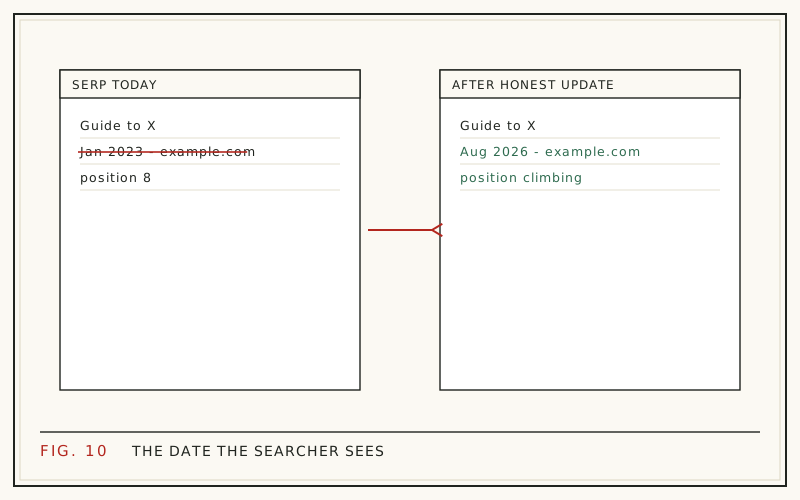
If your search snippet shows a date from three years ago, some searchers skip you before they read a word of your title. The fix is not to bump the date. The fix is to genuinely update the page, then make sure your visible date, your structured data, and your sitemap all agree so Google displays the date you actually earned.
Dates carry weight because searchers use them as a shortcut for trust. Google's own 2011 freshness update affected roughly 35% of searches, according to the company announcement quoted by Search Engine Land (2011), and the date beside your result still shapes the click decision on plenty of queries today.
This post covers how dates get into snippets, which queries show them, what Google considers artificial freshening, and the honest sequence for fixing a stale date on a page that deserves better.
How does Google decide which date to show?
Google picks the date; you only supply evidence. It weighs several signals and displays the one it trusts, or none at all. There is no setting that forces a date into your snippet.
The signals it reads include:
- The visible byline date on the page.
- datePublished and dateModified in your Article structured data.
- The lastmod value in your XML sitemap.
- Dates written into the copy itself, including headings and 'as of' statements.
- Dates in the URL slug, such as /2021/03/.
- Its own crawl history of the page.
When those disagree, Google resolves the conflict on its own. That is why a page you genuinely revised last month can still show a date from 2022: the visible byline never moved, the slug still carries the old year, and the schema was the only thing you updated.
Why does a stale date cost you clicks?
Because clicks are already scarce, and the date is one of the three or four things a searcher reads before deciding. SparkToro and Datos found that 58.5% of US Google searches in 2024 ended without a click to the open web (SparkToro, 2024). Of the clicks that remain, you are competing on a snippet that is mostly title, date, and one line of description.
On queries where currency matters, an old date reads as a warning label. The searcher does not know your advice still works. They see 2021 next to a competitor's 2026 and assume the newer page reflects the current interface, the current pricing, the current rules.
The damage shows up as falling click-through rate at a stable average position. Impressions hold, rank holds, clicks slide. That pattern is one of the quieter forms of decay, and it is covered in more depth in how aging titles quietly lose clicks.
Which searches actually show dates?
Not all of them. Google leans on dates when the query implies currency: news, releases, software steps, pricing, rankings, 'best' lists, anything version-specific. For definitional and evergreen questions, dates often disappear from the snippet entirely, and age matters far less.
That distinction matters before you spend a morning re-dating an archive. A tutorial for a tool that ships monthly updates lives or dies on freshness. An explainer about a concept that has not changed in a decade does not.
Answer engines add a second reason to care. Ahrefs measured that URLs cited by AI assistants are on average 25.7% fresher than the organic results for the same queries (Ahrefs, 2026). That is correlation, not a documented ranking rule, but it points the same way: on time-sensitive topics, current pages get quoted more often.
What counts as fake freshness?
Fake freshness is any attempt to look updated without being updated. Google's guidance for site owners tells publishers not to artificially freshen pages, and its systems can compare your claimed dates against what it saw during previous crawls.
The usual patterns:
- Bumping the visible date or dateModified with no content change.
- Scheduled mass re-dating across a whole archive.
- Republishing an old post with a brand new datePublished.
- Adding a token paragraph so a date change feels justified.
- Removing dates entirely so nobody can tell how old the page is.
The realistic consequence is not a dramatic penalty. It is quiet distrust. Google starts ignoring your dates, substitutes its own estimate, or drops the date from the snippet. You lose the one snippet element you could have controlled honestly.
How do you find the pages where a stale date is hurting?
Work from your own Search Console data rather than from publish dates. Open the Performance report, compare a recent 28-day window against the same window a year earlier, and sort pages by lost clicks. Then look at the two columns that separate a date problem from a ranking problem.
The signature you want is clicks down, impressions flat or up, average position roughly unchanged, CTR down. That combination says people are still seeing you and choosing someone else. A stale date is one of the few explanations, alongside a tired title and new SERP features.
Run the same page through a live search for its main query. Look at what Google is actually displaying next to your result and what the competing snippets show. The full workflow is in how to find decaying content in Google Search Console.
Fix the content first, the date second
The honest sequence is always the same: change the page, then change the date. Reverse it and you are guessing that Google will not notice, which is a bad bet on a system that keeps crawl history.
A refresh that earns a new date usually includes some mix of these:
- An introduction rewritten to answer the query in the first two sentences.
- Statistics, screenshots, and prices replaced with current ones.
- Steps corrected where the interface or the rules changed.
- New sections or an FAQ covering questions the page never addressed.
- Dead links removed or repointed.
That is a session of real work per page, not a bulk action. The step-by-step version is in the refresh playbook for old blog posts.
Make the date you earned actually appear
A real update that Google never notices is wasted effort. After the edit, get every date signal saying the same thing.
- Show an updated line readers can see, such as 'Published March 2023 - Updated August 2026'.
- Set dateModified in your Article schema to the same day, and leave datePublished alone.
- Confirm your sitemap lastmod reflects that date rather than a nightly regeneration of every URL.
- Update any in-copy 'as of' statements you actually re-verified.
- Request reindexing for the URL so the change is picked up sooner.
One detail catches people out: WordPress stamps post_modified on every save, including a typo fix. If your theme prints the modified date, trivial edits silently re-date the post. The mechanics of both fields are covered in how to update dates without faking freshness.
The year-in-title trap
A year in the title is a promise with an expiry date. 'Best Project Management Tools (2024)' looked sharp in 2024 and looks abandoned now, even if the body is current. Worse, it gives Google a second date signal that contradicts your fresh dateModified.
Rewriting the year is legitimate only when the content behind it is current for that year. If you cannot say that honestly, drop the year instead of advancing it. A title without a year ages far more gracefully than one that is wrong.
While you are editing the title, remember Google may replace it anyway. Zyppy's study of 80,959 title tags found Google rewrote 61.6% of them, with the fewest rewrites in the 51 to 60 character range (Zyppy, 2022). Title tactics that survive that filter are in rewriting titles and meta descriptions for CTR.
Leave historical facts where they are
An honest update changes what is current without rewriting what happened. A 2019 case study stays a 2019 case study. Survey figures keep their fieldwork year even when you add newer numbers beside them. Version notes keep the version they described.
This is exactly where automated rewriting tends to go wrong, so it is a deliberate limit in RefreshRank: date updates are proposed only as part of a real refresh, every change appears as a current-versus-proposed diff that a person approves, and historical statements are left alone. Nothing publishes on its own, and applied edits land as ordinary WordPress revisions you can roll back in one click.
The general principle holds whatever tool you use. Freshness means the advice is current, not that every number on the page wears this year's date.
Did the fix earn anything?
Measure it the way you would measure any refresh. Write down the day the update went live, wait for Google to recrawl and settle, then compare the 28 days after against the 28 days before in Search Console. Expect a lag of two to six weeks before the picture is stable.
For a date and snippet fix specifically, the win looks like higher CTR at roughly the same average position. Clicks rise without any ranking movement. If position also improves, the content work behind the date is probably doing that, not the date itself.
The comparison method, including how to avoid fooling yourself with seasonality, is in how to measure content refresh results. If you would rather not hunt for stale-date candidates by hand, the free RefreshRank plugin reads your own Search Console history in 28-day windows and surfaces the pages losing clicks first.
Questions
Why does Google show an old date on my updated post?
Because your date signals disagree. Google reads the visible byline, your structured data, sitemap lastmod, dates in the copy and URL, and its own crawl history, then shows the one it trusts. If only your schema changed, the older visible date usually wins. Align all of them, then request reindexing for the URL.
Can I remove the date from my search snippet?
Not reliably. There is no supported switch that hides the date, and stripping dates from the page often makes things worse: Google may estimate a date without your input, and readers treat undated advice as suspect. On informational queries, a credible visible date usually helps more than no date at all.
Does updating the date improve rankings?
Not on its own. A date change with no content change gives Google nothing new to evaluate, and repeated mismatches with crawl history erode trust in your dates. What moves results is the update behind the date: corrected steps, current facts, and a title that matches how people search now.
How much do I have to change to justify a new date?
Enough that a returning reader would notice. Rewritten intros, replaced statistics, corrected steps, and new sections all clear the bar. Typos, formatting, and image swaps do not. A workable internal test: if you cannot write one sentence describing what changed and why it matters, do not surface a new date.
Should I put the current year in my title?
Only if the content is genuinely current for that year, and only if you will maintain it annually. A year in the title is a promise that expires. When the page will not get yearly attention, leave the year out entirely; an undated title ages better than one that is visibly wrong.
Do all search results show dates?
No. Google surfaces dates mainly on queries where currency matters, such as news, software steps, pricing, and 'best of' lists. Evergreen and definitional queries often show no date at all. Check a live search for your target query before assuming a stale date is what is costing you clicks.
Is changing dates in bulk across my archive risky?
Yes. Mass re-dating is the clearest form of artificial freshening, and it is easy for Google to spot by comparing your claimed dates against crawl history. The likely outcome is that your dates stop being trusted site-wide, which also devalues the dates on pages you genuinely did update.
Does an updated date help with AI search answers?
It appears to correlate. Ahrefs found that URLs cited by AI assistants are on average 25.7% fresher than the organic results for the same queries (Ahrefs, 2026). That is not a documented rule, but on time-sensitive topics an accurate dateModified backed by current content is one freshness signal you fully control.
Sources
- Search Engine Land - Google Search Algorithm Change For Freshness To Impact 35% Of Searches (2011)
- SparkToro + Datos - 2024 Zero-Click Search Study (2024)
- Ahrefs - What Is Content Decay? (And How to Fix It) (2026)
- Zyppy - Google Rewrites 61% of Page Title Tags (2022)