 RefreshRank
Adding FAQ Sections to Old Posts: When It Helps and How
Adding a FAQ section to an old post is still worth doing, but not for the reason most guides give. Google restricted FAQ rich results in August 2023 to well-known, authoritative government and health sites, so the expanded search listing bloggers once chased is effectively gone. The durable value is different: a FAQ section lets one page answer the question-shaped, long-tail queries that surround its main topic.
Those questions are everywhere on the results page. Semrush's 2020 study found People Also Ask boxes on 49.37% of desktop and 52.27% of mobile SERPs, and every expanded entry in those boxes is a page that answered one specific question plainly. A well-built FAQ block is the cheapest way to become that page.
Here is when a FAQ section earns its place on an old post, and how to build one from real queries instead of guesses.
What happened to FAQ rich results in 2023?
In August 2023, Google announced it would show FAQ rich results only for well-known, authoritative government and health websites, and retired HowTo rich results entirely. For everyone else, the expandable question dropdowns under search listings stopped appearing, even with valid markup on the page.
Any guide promising that FAQ schema will get you a bigger search listing is describing the pre-2023 world. The markup is still technically valid and harmless - it just no longer renders for a normal blog. Plan the section for readers and long-tail queries, not for a rich result.
Why FAQ sections still earn traffic
Every substantial topic trails a cloud of small questions: does X work with Y, how long does X take, is X free. Each one is a real query with real impressions, usually too small to justify its own post but easy to answer well in eighty words. A FAQ section turns one page into a landing zone for that whole cloud.
Those are also exactly the questions Google surfaces as People Also Ask, so a page that answers them cleanly competes for PAA slots on results pages beyond its own. The craft is the same answer-first writing covered in answer-first introductions, applied one question at a time.
Why old posts are the right place for FAQs
Old posts carry the audience. HubSpot's long-running 'Optimizing the Past' program found that 76% of its monthly blog views came from old posts, and that updating old posts lifted monthly organic search views by an average of 106% (HubSpot, 2015, page updated 2025). An addition to a page with standing traffic and rankings compounds; the same words on a brand-new URL start from zero.
Old posts also come with evidence. After a year or two in the index, Search Console shows exactly which questions a page already earns impressions for, so the FAQ can be built from data instead of brainstorming. New posts force you to guess; old posts let you read. That is why the FAQ step sits late in the refresh playbook, after the query mining is done.
Which posts deserve a FAQ section?
Not every post needs one. A quick triage using each page's Search Console data:
| Signal | Add a FAQ section? |
|---|---|
| Page gets impressions for question-shaped queries it never directly answers | Yes - the highest-payoff case |
| A People Also Ask box appears on the page's main SERP | Yes - source questions straight from it |
| Page earns impressions for a second, distinct topic | Maybe - a separate post may serve it better |
| Page is thin, outdated, or off-intent overall | No - fix the core content first |
If a page fails the triage entirely, it belongs in the update, rewrite, or delete framework before it gets any new sections bolted on.
Find real questions, not invented ones
The FAQ's value depends entirely on whether people actually ask the questions. Three sources, in order of strength:
- Search Console: filter the page's queries for who, what, how, why, can, does, and is - these are questions the page already surfaces for.
- The live SERP: expand the People Also Ask box on the page's main query and note which entries your post could answer better.
- Your inbox: support emails and post comments surface the questions searchers have not learned to phrase yet.
Never pad the list with invented questions to hit a count. The query-mining workflow is the same one described in finding decaying content in Search Console.
Write answers that stand alone
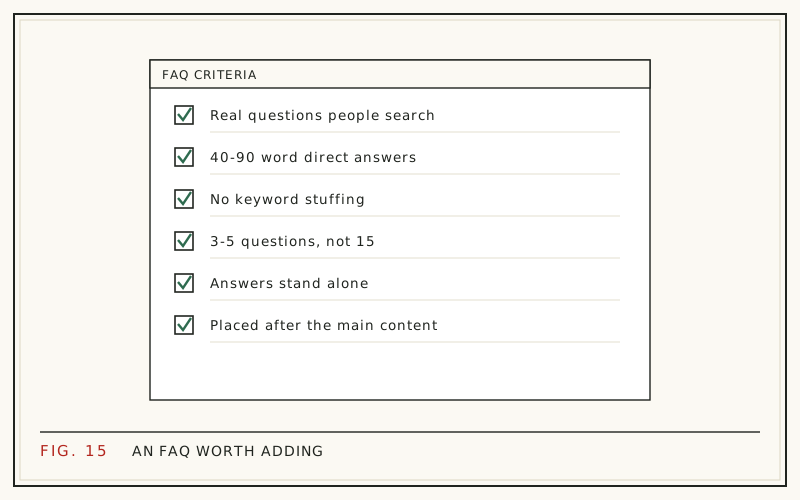
Each answer should run 40 to 90 words, open with the direct answer in its first sentence, and cover exactly one idea. A reader who lands on that single question-and-answer pair - from a People Also Ask click or an in-page anchor - should leave satisfied without reading anything else on the page.
Avoid 'it depends' openers unless the very next clause says what it depends on. Keep the page's normal voice, too: a FAQ that suddenly sounds like a legal notice reads as bolted-on, and readers notice the seam.
How many questions should you add?
Three to five. Fewer than three barely registers as a section; more than five starts reading as padding, and a wall of marginal questions dilutes the strong ones. Every question has to earn its slot with real query evidence behind it.
If you found ten good questions, that is not a longer FAQ - it is a sign the topic may deserve a second post, or that several questions share one underlying answer and should be merged into it.
Should you still add FAQ schema?
For a normal blog, FAQPage markup no longer produces a rich result, so it has moved from 'must' to 'optional'. If your theme or SEO plugin adds it automatically, leave it alone - it is valid and harmless. Hand-coding JSON-LD for every post, though, is effort better spent writing one more genuinely useful answer.
The visible content is the asset. Search engines read the questions and answers on the page either way, and so do the people who arrive on it.
Placement and formatting that work
Put the section at the end of the post under a plain heading like 'Frequently asked questions'. Readers who reach it have finished the main content, and searchers who land on it via a specific question get a clean, scannable block instead of hunting through prose.
Format each question as a subheading in the reader's own words, give the answer as a short paragraph directly beneath, and link to deeper resources where an answer genuinely needs more room. Resist scattering question-and-answer pairs through the body: a consolidated block is easier to maintain on the next refresh, and its effect is measured the same way as any other update, per how to measure content refresh results.
Drafting FAQs from the page's real queries
The slow part of this workflow is the query mining, multiplied across every post in a refresh queue. That is the part worth automating. RefreshRank syncs up to 16 months of your site's own Search Console data, flags decaying pages, and - on paid plans - drafts a FAQ section informed by the questions the page actually surfaces for. Each draft appears as a current-versus-proposed diff you approve, edit, or reject; applied changes are standard WordPress revisions with one-click rollback, and nothing is ever published automatically.
Decay detection is free on one site with the RefreshRank plugin - no card, no signup form - and the FAQ task's exact scope is documented in the rewrites docs.
Questions
Do FAQ rich results still show up in Google?
For most sites, no. Since Google's August 2023 change, FAQ rich results appear only for well-known, authoritative government and health websites, and HowTo rich results were removed entirely. Your FAQ markup remains valid but will not render as dropdowns for a typical blog. The section's value now comes from answering long-tail queries, not from the listing itself.
How many FAQs should a blog post have?
Three to five well-evidenced questions beat a long wall of filler. Below three, the section barely registers; beyond five, marginal questions dilute the strong ones and the block starts to read as keyword padding. If you have many strong candidates, check whether some share one underlying answer or whether one of them deserves its own post.
Where should the FAQ section go on the page?
At the end of the main content, under a clear heading such as 'Frequently asked questions'. Use each question as a subheading in the searcher's own words, with a short standalone answer directly beneath it. A single consolidated block is easier for readers to scan and easier for you to maintain at the next refresh.
Do FAQ sections help you appear in People Also Ask?
There is no guaranteed path into PAA, but the pages that fill those boxes share one trait: they answer a specific question directly, in a short self-contained passage. Semrush found PAA boxes on roughly half of results pages in its 2020 study, so writing clean answers to real questions gives one post many small chances to be picked.
Should FAQ answers repeat content from the article?
Light overlap is fine and often necessary, because each answer must stand alone. Do not copy paragraphs verbatim - compress instead. A good FAQ answer restates the article's point in 40 to 90 words for someone who will read nothing else on the page, and adds the one detail the main text glossed over.
Can I add a FAQ section to any old post?
Mechanically yes, but it only pays on posts with standing impressions for question-shaped queries. On a thin or off-intent post, a FAQ is decoration on a page that needs structural work first. Triage with the page's own Search Console data before writing anything, and fix the core content before adding sections to it.
How long should each FAQ answer be?
Aim for 40 to 90 words. That is long enough to answer completely and short enough to stay scannable and quotable. Open with the direct answer, add one qualifier or example, and stop. If an answer keeps growing past a hundred words, it is probably a section of the article, not a FAQ entry.
Is FAQ schema still worth adding?
It is optional now. The markup no longer earns a rich result for normal sites, but it remains valid, and if your SEO plugin generates it automatically there is no reason to strip it out. Just do not spend manual effort on JSON-LD - the visible questions and answers on the page carry the actual value.
Sources
- Google Search Central - Changes to HowTo and FAQ rich results (2023)
- Semrush - People Also Ask Study (2020)
- HubSpot - Optimizing the Past (2015, updated 2025)