 RefreshRank
Content Pruning: When Deleting Old Posts Helps SEO
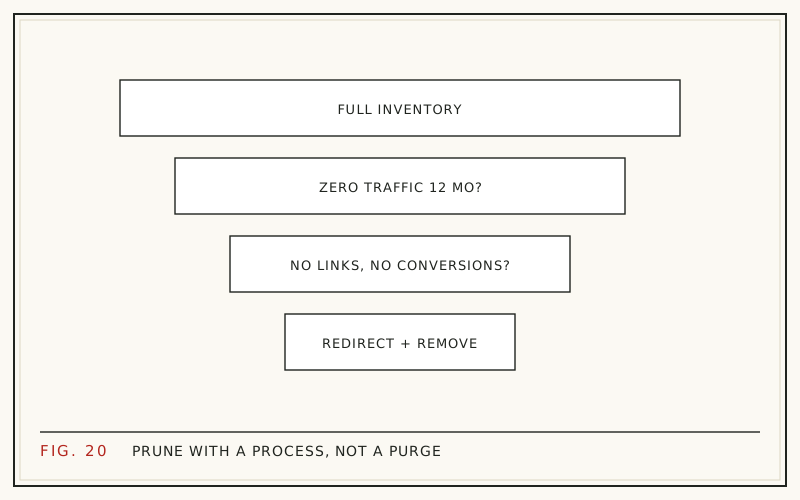
Deleting old posts helps SEO in one narrow situation: when a page is thin, duplicative, or aimed at nothing anyone searches for, and it earns no clicks, no meaningful impressions, and no backlinks. Pruning those pages sharpens what remains. Deleting anything else - especially older posts that still rank - usually costs you traffic for nothing.
This guide is an honest look at pruning: when it genuinely helps, when updating is the better call, how to redirect what you remove, and why crawl budget is the wrong reason for a small site to delete anything.
What content pruning actually means
Pruning is the deliberate removal of pages that add nothing: deleting them, redirecting them, or merging them into stronger pages. The goal is a site where nearly every indexed URL has a job - answering a query, earning links, or supporting a conversion.
Pruning is one option among several, not the default. For every candidate page, the honest sequence is: can this be updated to earn traffic again, can it be merged into something better, and only then, should it go. Our framework on update, rewrite, or delete walks that decision in detail.
Why some pages deserve to go
Most published content earns nothing. Across roughly 14 billion pages in Ahrefs' Content Explorer index, 96.55% get zero organic traffic from Google (Ahrefs, 2023). Every blog that has published steadily for a few years holds its own share of that dead weight.
Genuine prune candidates share a profile: thin pages written for keywords nobody searches, near-duplicates competing with each other, announcements about events long past, and tag or archive pages that got indexed by accident. These pages do not just sit there neutrally - duplicates can split relevance for a query between two weak URLs where one strong page would rank better.
Why old is not the same as worthless
Age alone is never a reason to delete. In Ahrefs' study of top-ranking pages, 72.9% of pages in Google's top ten were more than three years old (Ahrefs, 2023). Old pages are not the problem; abandoned ones are.
Older content also tends to carry the compounding value of a blog. HubSpot's analysis found 76% of its monthly blog views came from posts published in earlier months (HubSpot, 2015 analysis, updated 2025). Delete carelessly and you are cutting into the archive that pays the bills. A declining old post with real history is showing content decay, which makes it a refresh candidate, not a prune candidate - that distinction is the whole game.
The crawl-budget myth for small sites
The most common pruning pitch is that deleting pages frees crawl budget so Google crawls your good pages more often. For small sites, this is mythology. Google's own crawl budget documentation is explicitly aimed at very large sites and says most sites do not need to worry about it (Google Search Central). A blog with 300 posts is not straining Googlebot, and never was.
Prune for real reasons instead: clarity of site focus, fewer weak pages competing for the same query, less to maintain, and a better experience for anyone browsing your archive. Those benefits are honest. A promised crawl-efficiency windfall on a small site is not.
Update, consolidate, redirect, or delete: the decision table
| Page profile | Action |
|---|---|
| Declining traffic, topic still relevant | Update and refresh |
| Wrong angle or outdated approach, keyword still valuable | Rewrite |
| Several weak posts covering one topic | Consolidate into one, redirect the rest |
| No traffic, no links, but a close topical neighbor exists | Delete with a 301 to the neighbor |
| No traffic, no links, no related page at all | Delete and serve 404 or 410 |
Work the table top to bottom. The order matters because updating preserves history that deletion destroys - a page's accumulated links and query associations are gone the day the URL dies. Our guide to prioritizing content updates covers how to rank the update candidates once you have separated them out.
Finding prune candidates in Search Console
Search Console gives you 16 months of history, which is enough to judge a page fairly across a full year of seasonality. In the Performance report, filter to a single page and check clicks and impressions over the last 12 months. A true prune candidate shows near-zero on both - not a decline, an absence.
Before condemning any URL, check two more things: backlinks, because a page with referring domains should be redirected rather than left to 404, and internal links, because links pointing at a removed page need updating too. The export and comparison mechanics are covered in finding decaying content in Search Console.
Redirects done right
When a deleted page has any value at all - links, bookmarks, residual traffic - redirect it with a 301 to the closest relevant page. Closest is the operating word. Mass-redirecting every deleted URL to your homepage does not transfer relevance; Google typically treats irrelevant redirects as soft 404s, which is the same as no redirect with extra steps.
When nothing relevant exists, let the URL return 404 or 410. A clean 404 on a worthless page is a normal, healthy signal, not an error to paper over. Keep a dated log of what you removed and where each URL redirects, so traffic questions months later have answers.
Consolidation: the prune that usually wins
The highest-value pruning move is rarely pure deletion - it is merging. Three thin posts answering variations of one question become one thorough post: pick the URL with the most history, fold in the unique material from the others, then 301 the losers to the winner.
Consolidation keeps everything deletion destroys. The links pointing at all three URLs now support one page, the content gets deeper, and readers land on one complete answer instead of a fragment. If two of your posts keep trading rankings for the same query in Search Console, that is the classic consolidation signal.
What results to honestly expect
Pruning is maintenance, not a growth hack. Removing zero-traffic pages, by definition, removes no traffic, so do not expect a visible lift the following week. What you can expect: consolidated pages often perform better than any of their parts did, duplicate-query conflicts resolve, and future audits get faster because the inventory is smaller.
Measure it the same way you would measure a refresh - compare 28-day Search Console windows for the surviving pages before and after, and give it a couple of months. If a consolidation loses ground, revisit it; merged content can be re-split, since nothing about pruning has to be irreversible if you keep copies.
Prune with a safety net
Deletion is the one content action with no built-in undo, so build your own:
- Export the full content of every page before removing it, via Tools -> Export or a copy in a doc
- Prefer moving a post to draft for 30 days over immediate deletion - de-indexing starts either way, but recovery stays trivial
- Remember the trash empties after 30 days by default, and a post's revisions are deleted with it
- Recheck the decision list against fresh Search Console data before the final delete
The hardest part is separating truly dead pages from decayed ones worth saving. This is where decay data earns its keep: RefreshRank scores each page's decline against the site's own Search Console history and estimates win-back potential, so pages with something left to recover surface as refresh candidates before you delete them. The free plugin runs decay detection on one site with no card and no signup form.
Questions
Does deleting old blog posts improve rankings?
Not directly, and not sitewide. Deleting a zero-value page does not boost your other pages by magic. The realistic wins are narrower: consolidating overlapping posts so one strong page ranks instead of two weak ones, and removing thin pages that made the site look unfocused. If a post still earns meaningful clicks or has backlinks, deleting it only loses value.
Should I delete posts that get no traffic?
Only after three checks: no impressions worth keeping across 12 months in Search Console, no backlinks from other sites, and no better option available - many no-traffic posts are better updated or merged than deleted. A post that once earned traffic and declined is a refresh candidate. A post that never earned anything and never will is the true prune candidate.
Is a 301 redirect always better than a 404?
No. A 301 is right when a closely related page exists to receive the visitor and the link value. When nothing relevant exists, a 404 or 410 is the honest response. Redirecting everything to the homepage backfires: Google generally treats irrelevant redirects as soft 404s, so you gain nothing and confuse the few humans who follow old links.
Does content pruning help crawl budget on a small site?
Effectively no. Google's crawl budget guidance is written for very large sites; a blog with a few hundred URLs gets crawled comfortably regardless. Prune a small site for focus, quality, and maintainability - real benefits - rather than crawl efficiency. If someone pitches a pruning project for your small site on crawl-budget grounds, treat the whole pitch skeptically.
How long until pruning shows results?
Give it four to eight weeks minimum. Google needs to recrawl the removed URLs, process the redirects, and re-evaluate the consolidated pages. Compare 28-day Search Console windows for surviving pages before and after, and judge trends rather than single days. Removing genuinely dead pages shows no traffic change at all - that silence is the expected result.
Should I prune before or after refreshing content?
Sort first, then do both. Run one audit that classifies every page as keep, update, consolidate, or delete, so refresh effort is not spent on pages you later remove. In execution order, consolidations and deletions are quick and can go first; refreshes then work through the survivors by priority. One shared inventory keeps the two efforts from colliding.
Can I recover a post I deleted?
For 30 days, yes - deleted posts sit in the trash and restore with one click, revisions included. After the trash empties, the post and its revision history are gone from WordPress, and recovery means a database backup or a saved export. That is why exporting content before deletion, or parking posts as drafts first, is worth the extra minute.
What counts as thin content worth pruning?
Pages with nothing substantive to offer for their query: a two-paragraph post restating its title, near-duplicate posts targeting the same phrase, expired event announcements, and auto-generated archive pages that slipped into the index. Thin describes value, not length - a short page that fully answers its question is fine. Judge each page against what currently ranks for its target query.
Sources
- Ahrefs - 96.55% of Content Gets No Traffic From Google (2023)
- Ahrefs - How Long Does It Take to Rank in Google? (2023)
- HubSpot - Optimizing the Past: Historical Blog SEO (2015, updated 2025)
- Google Search Central - Crawl Budget Management For Large Sites