 RefreshRank
Too Many Old Posts? How to Prioritize Content Updates
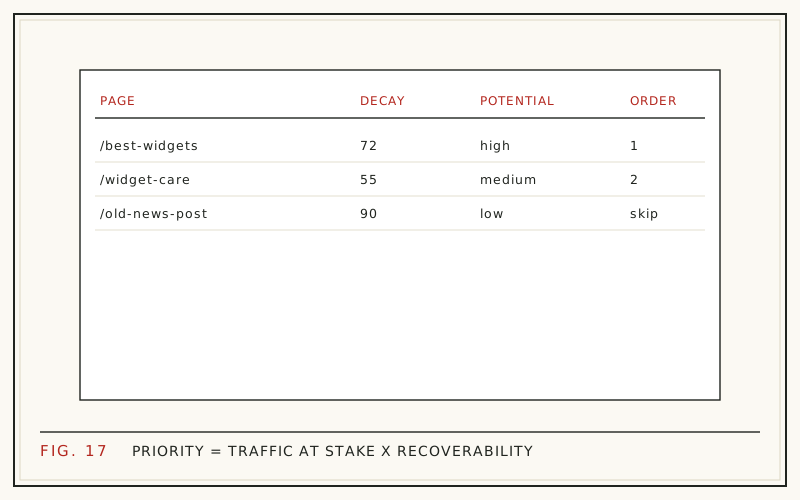
Prioritize content updates by win-back potential: how much traffic each post used to earn, how far it has fallen, and how likely a refresh is to recover it. Score those three factors, sort descending, and work the list from the top. That single change turns an overwhelming archive into a short, defensible queue.
The stakes sit in your back catalog, not your drafts folder. When HubSpot analyzed its own blog, 76% of monthly views came from old posts rather than that month's new ones (HubSpot, 2015, updated 2025). The posts you already published are the asset. The only real question is which of them deserves attention first.
Why oldest-first and newest-first both fail
Sorting by publish date feels organized and wastes most of your effort. Oldest-first marches you through pages that never earned traffic and never will. Newest-first polishes posts that have not had time to decay. Neither order asks the only question that matters: where is recoverable traffic sitting right now?
The scale of the miss is well documented. Ahrefs' study of about 14 billion pages found that 96.55% get zero organic traffic from Google (Ahrefs, 2023). Refreshing a page that never ranked recovers nothing. Prioritization exists to keep you off those pages and on the ones with proven demand.
Win-back: past traffic is proof of demand
A post that once pulled 800 monthly clicks and now pulls 200 is not a failure. It is a proven asset with a 600-click gap. The queries exist, Google already trusted the URL once, and the links and history that earned the original ranking are still attached to it. That is what makes decayed pages the cheapest traffic most sites can go get.
Contrast that with a brand-new post, which starts with no history and no proof that anyone searches for it. Refreshing is the lower-risk bet because the demand is already demonstrated. If the underlying concept is new to you, start with what content decay is and why it happens.
Factor 1: peak traffic, the size of the prize
Peak traffic tells you what a page has proven it can do. For each post, find its best 28-day window across the period you have data for - Google Search Console keeps 16 months of history, which is enough to catch most peaks.
Expect the distribution to be brutally top-heavy. HubSpot's study of roughly 20,000 posts found that about 1 in 10 posts compound over time, and those posts generate 38% of total blog traffic (HubSpot, updated 2025). A handful of former winners will dominate your peak column, and that is exactly where refresh effort pays.
Pulling these numbers by hand is covered step by step in finding decaying content in Search Console.
Factor 2: decline, how far it has fallen
Decline is the gap between the peak window and the most recent 28-day window. Look at it two ways, because each view catches something the other misses.
Absolute decline ranks the size of the recoverable traffic: a post that fell from 1,000 monthly clicks to 400 has 600 clicks on the table, while a post that drifted from 60 to 50 has ten. Percentage decline flags posts collapsing fast, which often respond best to a refresh because the fall is recent and the cause - a stale title, an outdated answer, a competitor's newer page - is usually still identifiable and still fixable.
A page high on both lists is an obvious first target. A page high on neither can wait, whatever its age.
Factor 3: recoverability, can you actually win it back?
Recoverability asks whether a refresh can plausibly reverse the decline. Signals that say yes:
- The page still ranks on page one or two for its main queries.
- The topic still has search demand and the intent has not shifted.
- The decline tracks content staleness, not a lost backlink profile.
- You can still write the best answer with current facts.
Signals that say no: the query itself died, the results page now rewards a different format entirely, or the drop is a seasonal rhythm rather than decay. Separating that last case out is covered in content decay vs seasonality.
A scoring formula you can run in a sheet
You do not need software to start. One row per post, one column per factor:
| Post | Peak 28-day clicks | Current | Decline | Recoverability | Score |
|---|---|---|---|---|---|
| Guide A | 1,200 | 300 | 900 | 0.8 | 720 |
| Tutorial B | 400 | 80 | 320 | 0.9 | 288 |
| News post C | 900 | 100 | 800 | 0.2 | 160 |
Score = (peak - current) x recoverability. Guide A outranks News post C despite a similar-sized fall, because the news topic is gone for good. Sort by the score column and your refresh order is done. Keep the recoverability estimate rough; 0.2, 0.5, and 0.8 are precise enough to order a queue.
What to deprioritize without guilt
A good priority list is defined by what it leaves off:
- Posts that never ranked: there is nothing to win back; they need a rethink, not a refresh.
- Seasonal dips: compare year over year before spending any effort.
- Wrong-intent pages: if the results page shifted from guides to tools, an update will not save it - see update, rewrite, or delete.
- Topics you have exited: recovering traffic with no business relevance is a vanity win.
Deprioritized does not mean deleted. It means those pages wait until the high-score queue has been worked through, which on most sites buys you months of better-spent effort.
Turn the ranked list into a weekly cadence
A ranked list becomes progress when you attach a cadence to it. A realistic solo pace is two to three refreshes a week, with each pass scoped to the high-impact surface: title, meta description, introduction, FAQ coverage, and an honest date update. The full pass is documented in how to refresh old blog posts.
The payoff for working the top of the list, rather than all of it, is documented too. HubSpot's historical optimization program - deliberately updating old posts instead of only writing new ones - increased organic search views of updated posts by an average of 106% (HubSpot, 2015, updated 2025).
How RefreshRank sorts the same queue
This prioritization model is exactly what RefreshRank automates. The plugin reads your site's own Search Console history - up to 16 months, in 28-day windows, synced daily - scores each page's decay from 0 to 100, and estimates a win-back Potential per page. The queue is sorted by Potential, so the sheet math above happens automatically and stays current as new data arrives.
The free plan covers decay detection and the full sorted queue for one site, permanently, with no card and no signup form. The prioritizing is the free part; what you do with the list stays entirely in your hands.
Re-score monthly, and measure what you shipped
Priority lists rot, because decay is continuous. A post refreshed in March can be sliding again by September, and pages that looked stable last quarter may have started falling this one. Re-run the scoring monthly: it takes minutes once the sheet exists, and it happens on its own if a tool maintains the queue for you.
Close the loop on every refresh you ship. Compare the 28 days after publishing changes against the 28 days before, per page, and log the result next to the score that justified the work. Over a quarter, that log tells you whether your recoverability guesses run optimistic or conservative, which sharpens the next round of scoring. The full method is in measuring content refresh results.
Questions
What is win-back potential in content updates?
Win-back potential is an estimate of how much lost traffic a refresh could realistically recover. It combines what a page earned at its peak, how far it has fallen since, and how plausible recovery is given its current rankings and the state of the results page. Sorting by it puts the highest-value, most fixable pages at the top of your queue.
How many posts should I refresh per month?
Most solo publishers can sustain eight to twelve meaningful refreshes a month; small teams manage more. The number matters less than the order: five refreshes from the top of a Potential-sorted list usually beat twenty chosen by feel. Set a cadence you can hold, then let the ranked queue decide what fills it.
Should I update posts that never got traffic?
Not as refreshes. With Ahrefs finding that 96.55% of pages get no Google traffic at all (Ahrefs, 2023), most never-ranked posts fail for structural reasons: wrong topic, wrong intent, or no demand. They belong in a separate rethink-or-prune review, because there is no previous performance to win back.
How do I know a drop is seasonal rather than decay?
Compare the same 28-day window against last year. A seasonal page falls and recovers on a calendar rhythm and looks roughly flat year over year; a decaying page is down year over year and keeps sliding across consecutive windows. Running this check before scoring keeps predictable seasonal dips out of your priority list.
Which positions are easiest to win back?
Pages sitting around positions 4 through 15 tend to be the most productive targets. They retain enough standing that Google re-evaluates them quickly, and modest gains in relevance or click-through translate into real traffic. A page that has slid to page five or beyond usually needs a deeper rebuild than a refresh can deliver.
Is it better to update old posts or write new ones?
It is not either-or, but updates usually pay off faster because the page already has history, links, and proven queries attached. New posts build coverage for topics you have never addressed. A practical split for an established blog: keep publishing, but reserve a fixed share of capacity - a third is common - for working the refresh queue.
How often should I re-prioritize the list?
Monthly is a good default. Search data shifts daily, but priority order changes much more slowly, and monthly re-scoring catches new decliners without turning prioritization into a hobby. Re-score sooner after a confirmed Google core update, since those can reshuffle which pages are falling and which have quietly recovered.
Does RefreshRank's free plan include the full prioritized queue?
Yes. The free plan connects one site's Search Console data and shows the complete decay queue sorted by win-back Potential, permanently and without a card - it is not a trial. Paid plans add AI-drafted refresh proposals that you approve or reject; the detection and prioritization layer itself stays free.
Sources
- HubSpot - Optimizing the Past (2015, updated 2025)
- HubSpot - Compounding Posts Generate 38% of Your Blog's Traffic (updated 2025)
- Ahrefs - 96.55% of Content Gets No Traffic From Google (2023)