 RefreshRank
What Is Content Decay? Why Good Posts Lose Traffic
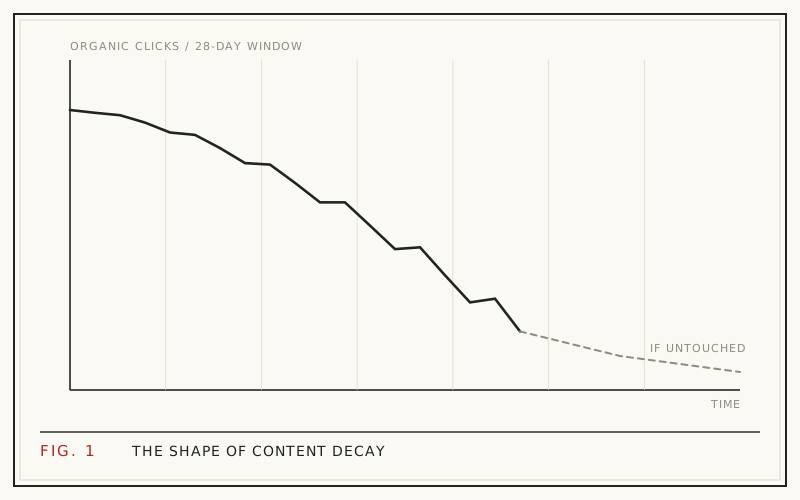
Content decay is the gradual loss of organic search traffic that a published page suffers over time. No penalty lands and nothing breaks - the post simply earns fewer clicks each month, because the search results around it keep changing while the page stands still.
The stakes are bigger than most site owners assume. HubSpot found that 76% of its monthly blog views came from posts published in earlier months (HubSpot, 2015 analysis). Old posts carry most blogs, so when the workhorses fade, the whole site fades with them.
This guide covers what decay looks like in your data, the four mechanics behind it, and how to measure it with 28-day windows so you catch it before the losses compound.
What content decay looks like in your data
Decay follows a recognizable curve. A post climbs for a few months after publication, plateaus, then starts a slow slide. Clicks usually fall first, then average position drifts down, and eventually impressions shrink as the page loses visibility for its secondary queries.
The slide is gradual, which is exactly why it goes unnoticed. A page losing a small share of its clicks each month never triggers an alarm, but the compounding loss over a year is severe. Decay is also page-level: two posts on the same site can move in opposite directions in the same month, which is why sitewide totals hide it.
Mechanic 1: the results page never stands still
Your ranking is not a fixed spot on a shelf. In 2023 alone, Google ran 719,326 search quality tests and launched 4,781 changes to search (Google, How Search Works). The results page you ranked on last year is not the page you rank on today.
Every one of those changes can reshuffle results, insert a new SERP feature above you, or reweight what Google considers the best answer for a query. Your post did not get worse. The scoreboard moved. This is the baseline condition of ranking: even a page that never changes is competing in an environment that changes thousands of times a year.
Mechanic 2: competitors publish and update
Rankings churn because new pages keep entering the contest. Every month, someone publishes a new guide targeting your keyword, and established rivals refresh their winners. When a competitor updates its examples, tightens its title, and earns a few new links, Google gets a fresher, better-matched answer - and your untouched post slips a spot.
Positions are rented, not owned. A #3 ranking is a snapshot of a contest that reruns every day, and standing still in a moving field is the same as falling behind.
Mechanic 3: your snippet ages and CTR fades
Even at a stable position, clicks can decline because the snippet itself goes stale. A title stamped with an old year, a meta description that names outdated tools, or a visible 2022 date next to your listing all nudge searchers toward fresher-looking results.
This is decay's quietest form: position holds, impressions hold, clicks drop. It is easy to miss because rank trackers show nothing wrong. We cover the pattern in detail in how aging titles quietly lose clicks.
Mechanic 4: search intent drifts
What a query means changes over time. "Best laptops" means different machines every year. A tutorial written for an old interface stops matching what searchers need, even when the keywords still match perfectly.
Google reads this through user behavior. When searchers start skipping your listing or bouncing back to the results, the ranking follows their verdict downward. Intent drift is the hardest mechanic to spot from inside your own site, which is why diagnosing it usually starts with searching your target query and reading what ranks now.
Doesn't old content rank well, though?
Yes - and that is not a contradiction. Ahrefs found the average page ranking #1 in Google is five years old (Ahrefs, 2023). Age itself is an asset: mature pages have accumulated links, engagement history, and topical authority that new pages lack.
The problem is neglect, not age. The old pages that hold top rankings for years are overwhelmingly maintained pages. Decay is what happens to old pages nobody tends, and the difference between the two is the update history, not the publish date. That distinction is also why refreshing works: it turns a neglected old page back into a maintained old page, which is the strongest position in search.
Why decay hits your best posts hardest
Decay's cost concentrates in your top performers, for a simple reason: they have the most traffic to lose. A post earning two thousand clicks a month that loses a third of them costs you more than ten minor posts dying outright.
Your best posts are also the ones competitors study and target, because your top ranking is their opportunity. The better a post performs, the more actively the market works to displace it. That makes your winners the pages most worth watching, not the ones you can safely ignore.
How to measure decay: 28-day windows
The clean way to measure decay is comparing trailing 28-day windows of Search Console data. A 28-day window always contains exactly four of each weekday, so weekend dips never distort the comparison the way uneven calendar months do. Compare the latest window against earlier windows, and against the same window last year to cancel out seasonality.
Google Search Console keeps 16 months of history - enough for a full year-over-year read. You can run this by hand using our Search Console walkthrough, or let the free RefreshRank plugin do the window math: it syncs your site's own Search Console data daily, scores each page's decay from 0 to 100, and sorts the queue by win-back Potential. Detection is free on one site, with no card and no signup form.
Decay or something else? A quick check
Not every traffic drop is decay, and refreshing pages will not fix a problem that lives somewhere else. Before acting, match your drop against the common patterns:
| Pattern | Likely cause |
|---|---|
| Slow page-level slide over months | Content decay |
| Sharp sitewide drop within days | Algorithm update or technical fault |
| Dips that repeat at the same time each year | Seasonality |
| Clicks fall while position holds | Stale snippet or new SERP features |
The gradual, staggered, page-level pattern is decay's signature. For the full ruling-out process, work through our traffic-drop diagnostic checklist, and for the most common confusion, see decay vs seasonality.
What to do when you find decay
Decayed posts are usually recoverable, and recovery rarely requires a full rewrite. The highest-return fixes are scoped: update the title and meta description, rewrite the intro so it answers the query directly, add an FAQ that targets real long-tail questions, and correct anything factually outdated.
The upside is well documented. HubSpot's historical optimization project - updating old posts instead of only writing new ones - lifted organic search views of updated posts by an average of 106% (HubSpot, 2015 analysis). Start with the pages that have the most traffic to win back, then follow the step-by-step refresh playbook.
Questions
Is content decay a Google penalty?
No. A penalty, formally a manual action, appears in Search Console with a written notice and usually causes a sharp drop. Decay has no notice and no single cause - it is the cumulative effect of SERP changes, competitor updates, aging snippets, and intent drift. If traffic slid gradually over months with no message from Google, you are looking at decay, not a penalty.
How fast does content decay?
It depends on the topic. Fast-moving subjects like software tutorials and product roundups can fade within months, while evergreen how-tos may hold for years before slipping. Most posts follow a climb-plateau-slide arc measured in quarters, not weeks. We break down the published research timelines in how fast content decays.
Does every page decay eventually?
Left untouched, most pages competing for real keywords will decay, because the environment around them keeps changing even when the page does not. Pages with little competition or unusually stable intent can hold for years. But any page earning meaningful traffic is a target, and targets get displaced unless they are maintained.
Can a decayed post recover on its own?
Occasionally - a competing page can decline, or a SERP shift can swing back in your favor. But drift-based recovery is luck, not a plan. Decay reflects a widening gap between your page and the current best answer for the query, and that gap rarely closes without an update on your side.
Should I delete decayed content?
Usually not as a first move. A decayed post with traffic history, backlinks, and a still-relevant topic is a refresh candidate, because it has already proven it can rank. Deletion or redirection makes sense only for thin, duplicative, or permanently obsolete pages that have nothing left to win back.
Does changing the publish date fix decay?
No. A date change without a substantive update is fake freshness, and Google discourages it. Dates are worth updating when they reflect a real revision - corrected facts, a rewritten intro, a new FAQ. The date should follow the update, never substitute for it. If you changed the substance, reflecting that in the modified date is both honest and useful to searchers.
How is content decay different from seasonality?
Seasonality is cyclical: traffic dips and returns on a predictable annual rhythm, and year-over-year comparisons come out roughly flat. Decay is directional: each period lands below the same period a year earlier, in season and out. Comparing matching year-over-year windows is the fastest way to separate the two.
What metrics catch decay early?
Watch clicks, average position, and CTR per page in trailing 28-day windows, compared against both the prior window and the same window last year. Clicks falling while position holds points at your snippet; position sliding points at the content itself. Track at page level - sitewide totals hide individual decliners behind healthy pages.
Sources
- HubSpot - Optimizing the Past (2015 analysis)
- Google - How Search Works: Rigorous Testing (2023)
- Ahrefs - How Long Does It Take to Rank in Google? (2023)