 RefreshRank
The Content Audit Deliverable: What to Hand Clients
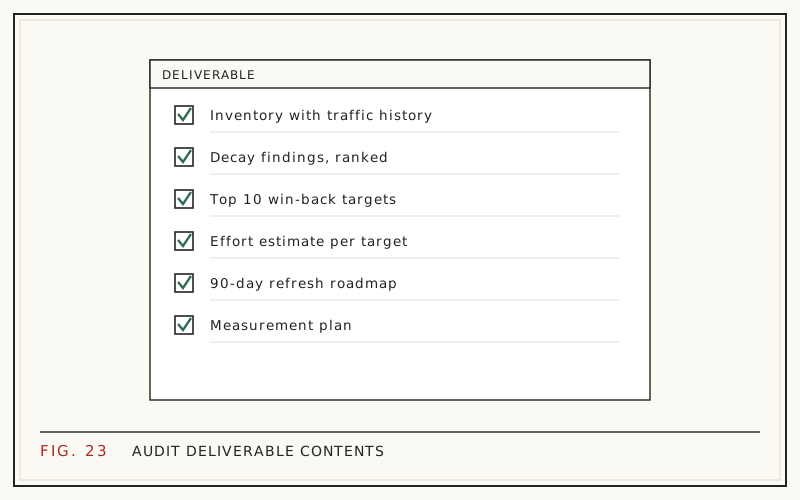
A content audit deliverable has three parts: a page-by-page inventory built on real search data, a verdict for every URL - keep, update, rewrite, or prune - and a prioritized roadmap for the next 90 days. Deliver it as a working spreadsheet plus a short summary document, not a 60-page PDF nobody opens twice.
The audit is often the first thing a client pays you for, and it sets expectations for everything that follows. A good one gives the client decisions, not just data. Here is what each part contains, the columns that earn their place, the mistakes that sink audits, and how the deliverable turns into ongoing work.
Why do clients need a content audit?
Because most content earns nothing, and nobody inside the company knows which pages are the exception. Ahrefs' study of roughly 14 billion pages found that 96.55% get zero organic traffic from Google (Ahrefs, 2023). Meanwhile the pages that do work carry a disproportionate load: 76% of HubSpot's monthly blog views came from posts published in earlier months (HubSpot, 'Optimizing the Past', 2015 analysis).
An audit sorts the client's pages into those two groups and attaches an action to each. That is the whole job: not a health score, not a maturity model - a sorted list with decisions on it. Everything in the deliverable exists to make those decisions defensible.
Part 1: the inventory
Start with every indexable URL and attach real numbers to each one. The columns that matter:
- URL, title, and content type
- Publish date and last-modified date
- Clicks and impressions, last 28 days
- Clicks in the same 28-day window one year earlier
- Average position for the page's main query
- The search intent the page targets
- Verdict and priority, filled in later
Google Search Console supplies the performance columns free, with one limit worth flagging to the client: it retains only 16 months of history, so year over year is the longest clean comparison you get. Pull the data before it ages out. The export steps are in our guide to finding decaying content in Search Console.
Part 2: decay findings
This is the evidence section, and it should be built from the client's own graphs. For each declining page, show the same 28-day window this year versus last year, name the pattern, and say what most likely caused it: slipping position, fading click-through on a stale title, or a results page that changed shape around the ranking.
Be careful to separate genuine decay from seasonal dips - a January drop on a tax-related page proves nothing. The year-over-year method in content decay vs seasonality keeps that distinction honest. Five to ten well-evidenced examples persuade more than a hundred unexplained red cells, because the client can follow the reasoning on each one.
Part 3: a verdict for every page
Every URL in the inventory gets exactly one verdict. Four are enough:
| Verdict | When it applies | Typical work |
|---|---|---|
| Keep | Stable or growing, still accurate | Nothing now; revisit next quarter |
| Update | Declining but still relevant | Title, meta, intro, FAQ, honest date update |
| Rewrite | Wrong intent or badly outdated | Restructure around the current query |
| Prune | No traffic, no links, no purpose | Delete and redirect |
Forcing a single verdict per page is what turns the audit into a decision document instead of a commentary. Ambiguity here multiplies downstream: a page marked 'maybe update?' never gets scheduled. The reasoning behind each call is laid out in update, rewrite, or delete.
Part 4: the priority queue
Verdicts say what; the queue says in which order. Rank update candidates by win-back potential: how much traffic the page used to earn, how far it has fallen, and how realistic recovery looks. A page that dropped from 900 monthly clicks to 300 outranks one that slid from 40 to 25, every time.
Refreshes lead the queue because the payoff is documented: when HubSpot systematically updated old posts, organic search views of updated posts rose by an average of 106% (HubSpot, 2015). The scoring method is covered in how to prioritize content updates. On WordPress sites, the free RefreshRank plugin builds the same queue automatically from the site's own Search Console history - each page gets a 0-100 decay score and a win-back Potential, and the queue sorts by Potential.
Part 5: the 90-day roadmap
Translate the queue into a calendar the client can hold you to. A workable shape:
- Month 1: quick wins - titles, metas, and intros on the ten highest-potential pages.
- Month 2: deeper updates on pages that need new sections or FAQ blocks.
- Month 3: pruning and redirects, plus the first before-and-after measurements.
Dates and owners matter more than polish here. A roadmap with a name and a week attached to every line gets executed; a thematic wish list gets admired in the handoff meeting and then shelved. If the client's team is doing the work, the owner column is the single most important thing you deliver.
The one-page summary clients read first
Write it last, put it first. One page: three findings, three numbers, three next steps. Something like: '38 of your 120 posts are declining year over year; the top ten of those account for most of the recoverable traffic; we recommend starting with titles and intros in September.'
Decision-makers who never open the spreadsheet will read this page, and it is the artifact that gets forwarded when budget comes up. If the summary cannot survive being read aloud in a meeting without you present, rewrite it until it can. Plain sentences, client vocabulary, no acronyms that need decoding.
Format: a working spreadsheet plus a short doc
The spreadsheet is the deliverable the client keeps using: sortable, filterable, and updateable as work completes. The document carries the narrative - findings, method, and roadmap - in ten pages or fewer. Skip the monolithic PDF; it freezes living data, buries the summary, and gets skimmed exactly once.
Share both in the client's preferred workspace and keep edit history on. Six months later, the columns you filled in become the baseline that proves progress, which is a quiet argument for keeping the audit alive as a working file rather than archiving it as a report.
Common audit mistakes
- Auditing everything at once. For a 2,000-page site, audit the sections that earn traffic first and say so in the scope.
- Verdicts without evidence. Every 'prune' needs the numbers that justify it sitting on the same row.
- Third-party traffic estimates. Use the client's Search Console data; estimates get challenged, first-party data does not.
- No owner or date on roadmap items. Unowned actions do not happen.
- Delivering and disappearing. Book the walkthrough call before you send the files, not after.
Each of these is cheap to avoid and expensive to repair. The walkthrough call in particular decides whether the audit becomes work or becomes shelfware.
From audit to ongoing work
An audit is a snapshot, and it starts aging the day you deliver it. Content keeps decaying, competitors keep publishing, and the roadmap needs hands. That is the honest case for recurring work, and the economics of the industry already lean that way: 78.2% of SEO providers charge a monthly retainer (Ahrefs SEO Pricing Survey, 2024).
Structure the handoff so the roadmap maps cleanly onto a monthly scope - a set number of refreshed pages, measured on before-and-after windows the client can verify in their own Search Console. How to package that as a repeatable service is covered in productizing content refreshes.
Questions
What should a content audit include?
Three things: a complete inventory of indexable pages with performance data from Search Console, one verdict per page - keep, update, rewrite, or prune - and a prioritized 90-day roadmap. Add a one-page summary on top for decision-makers. Anything beyond that, like technical crawl findings, belongs in a separate deliverable so the content decisions stay legible.
How long does a content audit take?
For a typical blog of 100 to 300 posts, plan one to two weeks: a few hours for the inventory and data pull, the bulk of the time on verdicts and evidence, then a day for the summary and roadmap. Automating the data collection shifts the time toward judgment, which is the part the client is actually paying for.
How many pages should a content audit cover?
Every indexable page belongs in the inventory, but verdict-level attention should go where traffic history exists. On large sites, audit the highest-earning sections first and state that scope in the deliverable. A focused audit of 200 pages with clear decisions beats a shallow pass over 5,000 rows that decides nothing.
What tools do I need for a content audit?
Google Search Console covers performance data free, a crawler builds the URL inventory, and a spreadsheet holds it all together. On WordPress sites, the RefreshRank plugin automates the detection layer - it syncs Search Console daily and scores each page for decay, free on one site - but the verdicts remain human work.
How often should you repeat a content audit?
A full audit once or twice a year, with a lightweight monthly check in between. Decay is continuous, so an annual-only rhythm leaves declines running unnoticed for months. Many agencies fold the monthly check into a retainer and reserve the full audit for scope resets, new engagements, or major site changes.
Should the deliverable be a PDF or a spreadsheet?
A spreadsheet plus a short document. The spreadsheet stays sortable and gets updated as work completes; the document carries the findings and the roadmap. A PDF-only deliverable freezes the data and tends to be skimmed once and filed. If the client requires a PDF, export the summary document, not the sheet.
What is the difference between a content audit and an SEO audit?
An SEO audit is mostly technical: crawlability, indexing, speed, structured data. A content audit judges the pages themselves - what each one earns, whether it still matches search intent, and what to do with it. They complement each other, but bundling them into one document usually buries the content decisions under technical findings.
Should you delete old posts as part of an audit?
Sometimes. Pages with no traffic, no links, and no strategic purpose are prune candidates, with redirects to the closest relevant page. But deletion is the verdict of last resort - a declining page with traffic history is usually worth updating first. The tradeoffs are covered in our guide to content pruning.
Sources
- Ahrefs - 96.55% of Content Gets No Traffic From Google (2023)
- HubSpot - Optimizing the Past (2015)
- Ahrefs - SEO Pricing Survey (2024)