 RefreshRank
The 20-Minute Content Decay Audit (Checklist Included)
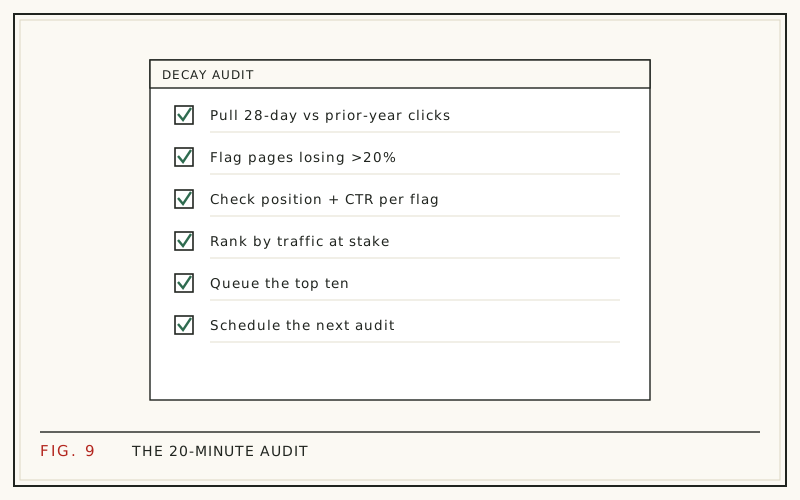
A useful content decay audit takes about twenty minutes a month and needs nothing beyond Google Search Console and a spreadsheet. You compare two 28-day windows, list the pages losing the most clicks, rule out seasonality, then pick two or three worth fixing. That is the entire job.
It is worth the twenty minutes because old posts carry most blogs. HubSpot found that 92% of its monthly blog leads came from posts published in earlier months (HubSpot, 2015 analysis). When those pages fade, the loss is quiet, gradual, and expensive.
The checklist below is the whole audit in order, followed by the reasoning behind each step: how to read the metrics together, how to separate decay from a seasonal dip, and how to decide which page gets your next free hour.
Why run a content decay audit?
Because the pages that earn anything are rare, and losing one hurts. Ahrefs' study of around 14 billion pages found that 96.55% of them get no organic traffic from Google at all (Ahrefs, 2023). Whatever small share of your library ranks, that share is doing nearly all the work.
Decay is also invisible in the places most people look. Sitewide traffic totals hide it, because a handful of declining pages can be masked by one seasonal riser. Rank trackers miss the version where position holds and clicks fall.
An audit exists to make the losses visible early, while they are still small enough to reverse. For the causes behind the pattern, see what content decay is.
What you need before you start
Three things, none of them paid. A verified Google Search Console property for the site, a spreadsheet, and a list of the pages you actually care about.
That last one saves the most time. Most sites have a few dozen pages that generate real traffic and a long tail that never will. Auditing the tail every month is busywork. Build the shortlist once, keep it in the sheet, and revisit it a couple of times a year.
One limitation to plan around: Search Console keeps 16 months of history. That is enough for exactly one year-over-year comparison, so if you want longer trends, export each month's numbers as you go rather than hoping to reconstruct them later.
The 20-minute content decay audit checklist
Work top to bottom. The first six steps are mechanical and take roughly five minutes once you have done them twice.
- Open Search Console, go to Performance, then Search results, and switch on Clicks, Impressions, CTR, and Average position
- Set the date range to Compare, last 28 days against the previous 28 days
- Open the Pages tab and sort by click difference, biggest losses first
- Copy the ten largest decliners into your sheet with their click change
- Rerun the same comparison against the matching 28 days one year earlier
- Drop any page whose year-over-year numbers are flat, since that is seasonality
- For each page left, note whether average position slipped or only CTR did
- Open the Queries view for each survivor and look for queries that lost impressions
- Search the page's main query in a private window and read what outranks you now
- Check the page itself for outdated facts, dead links, old screenshots, and a stale visible date
- Score each page by clicks lost against how recoverable it looks, then sort
- Pick the top two or three for this month and leave the rest in the sheet
- Record the date of every change you make so next month's audit can measure it
Everything after this section explains why each step is there and how to read what it returns.
How do you spot the decliners in five minutes?
Sort by click difference, not by clicks. Search Console's comparison mode adds a difference column to the Pages tab, and sorting on it puts your biggest losers at the top immediately. Most people sort by total clicks and end up reading their best pages instead of their worst trends.
Use 28-day windows rather than calendar months. A 28-day window always contains exactly four of each weekday, so a month with an awkward number of weekends cannot fake a decline.
The step-by-step version of this comparison, with the export options and the reporting limits worth knowing about, is in finding decaying content in Search Console.
How do you rule out seasonality?
Compare the same window a year apart. This is the single step that saves the most wasted effort, and it is the one people skip.
Seasonality is cyclical: a page dips and recovers on the same rhythm every year, so this year's window lands roughly level with last year's. Decay is directional: every window comes in below the equivalent window a year earlier, in season and out.
If a page is down 30% against last month but level against the same month last year, nothing is wrong and no rewrite is needed. The distinction, with examples of both curves, is in content decay vs seasonality.
What do the four metrics tell you together?
Individually they mislead. Read as a set, they point at a specific fix:
| What you see | Likely meaning | First move |
|---|---|---|
| Clicks down, position down | The content is losing the ranking contest | Coverage and depth |
| Clicks down, position steady | The snippet stopped earning the click | Title and description |
| Impressions down, position steady | Fewer searches, or lost secondary queries | Check query demand |
| Impressions up, clicks flat | New queries you rank for badly | Match intent, add sections |
| Everything down sharply, sitewide | Not decay | Check for technical faults |
The third row is the one that catches people out. A drop in impressions with no position change usually means search demand moved, and no amount of rewriting will bring back queries nobody is typing.
What should you check on the page itself?
Data tells you which page. Only reading the page tells you why. Open each shortlisted post and look for the things a searcher would notice in ten seconds.
Start with accuracy: figures with an old year attached, tools that no longer exist, prices that moved, screenshots from a previous interface. Then look at the opening. If the answer to the title's question is not visible in the first two sentences, you are losing readers who came for it.
Finally, compare against what currently ranks. Open the top three results for your main query and note what they cover that you do not. That gap list is your update brief, and it is usually shorter than expected.
Which pages deserve attention first?
Rank by what you can win back, not by what you lost in percentage terms. A page down 60% from 80 monthly clicks is worth less than a page down 12% from 3,000. Percentages flatter small pages and hide the ones that matter.
A workable score multiplies three things: the clicks the page has lost, whether the topic still has search demand, and how fixable the gap looks. A page sitting in positions 4 to 10 with a stale title is far more recoverable than one that has fallen to position 40.
That scoring logic, including how to run it in a spreadsheet, is set out in how to prioritize content updates.
How do you make next month's audit faster?
Keep one sheet, forever. Each row is a page; each month adds columns for clicks, position, CTR, and any change you made. After three months the sheet answers questions the current Search Console view cannot, including which of your updates actually worked.
Also record the date of every edit. Without it you cannot compare before and after honestly, and refresh work becomes a matter of opinion.
If the manual version stops fitting in twenty minutes, the free RefreshRank plugin runs the same comparisons against your site's own Search Console history, syncing daily, scoring each page's decay from 0 to 100 and sorting a queue by win-back potential. Detection is free on one site, with no card and no signup form.
How often should you run this?
Monthly for your top pages, quarterly for everything else. Any faster and you are reading noise: Search Console data moves week to week for reasons that have nothing to do with your content, and a single soft window is not a signal.
The threshold for acting is two or three consecutive declining windows on a page that still has demand. One bad month is weather. Three is a trend.
There is one exception. Pages tied to prices, product lineups, or software interfaces should get a look whenever the underlying thing changes, regardless of what the traffic is doing yet.
What happens after the audit
The audit produces a shortlist, not a plan. The next decision is what each page needs, and the three realistic answers are update, rewrite, or remove.
Most shortlisted pages need an update rather than a rebuild: a sharper title and description, an intro that answers the query in the first lines, an FAQ covering the questions the Queries view revealed, corrected facts, and an honest modified date. HubSpot reported that updating old posts lifted their organic search views by an average of 106% (HubSpot, 2015 analysis), and Orbit Media's blogger survey found that people who update old articles are twice as likely to report strong results from content marketing (Orbit Media).
Work through the update, rewrite, or delete decision first, then follow the refresh playbook for whatever survives that call.
Questions
How long does a content decay audit take?
About twenty minutes a month once your shortlist exists. The Search Console comparison and the year-over-year check take five minutes together; the rest is reading the two or three pages that came out on top. The first audit runs longer because you are building the page list from scratch.
What tools do I need to audit content decay?
Google Search Console and a spreadsheet cover it. Search Console supplies your own click, impression, position, and CTR data, which beats any third-party traffic estimate for your own site. Rank trackers and crawlers are useful for other jobs, but they are not required to find decaying pages.
How many pages should I audit at once?
Ten decliners, two or three fixes. Longer lists feel thorough and get abandoned. Since a small share of pages produces most of a site's traffic, working carefully through the biggest losses beats a shallow pass over everything you have ever published.
Why compare 28-day windows instead of months?
Because a 28-day window always contains exactly four of each weekday. Calendar months contain different numbers of weekends, and for most B2B sites that alone can swing traffic by a noticeable margin. Fixed windows remove that distortion so the change you see is a real change.
How do I know a drop is decay and not an algorithm update?
Look at the shape and spread. Decay is gradual and page-level: a few posts sliding across several windows while the rest of the site holds. Algorithm updates hit broadly and quickly, usually within a few days and across many pages at once. Check the update timeline against your drop date.
Should I audit pages with almost no traffic?
Not monthly. Pages with negligible clicks have nothing much to win back, so they rarely justify audit time. Review them once or twice a year with a different question in mind: whether they should be consolidated, redirected, or removed rather than refreshed.
Can I automate the content decay audit?
The detection half automates well, since comparing windows per page is arithmetic. Deciding what a page needs, and approving any change, should stay with a person. The free RefreshRank plugin handles the detection and queue ordering from your own Search Console data, and every proposed edit is shown as a diff a human approves before anything is published.
What should I record after each audit?
The date, the pages you shortlisted, the metric that flagged each one, what you changed, and the exact day you changed it. That last item matters most. Without a change date, before-and-after comparisons are guesswork, and you will never know which kinds of updates are worth repeating.
Sources
- Ahrefs - 96.55% of Content Gets No Traffic From Google (2023)
- HubSpot - Optimizing the Past (2015 analysis)
- Orbit Media - How to Update Content for SEO