 RefreshRank
Why Did My Blog Traffic Drop? A Diagnostic Checklist
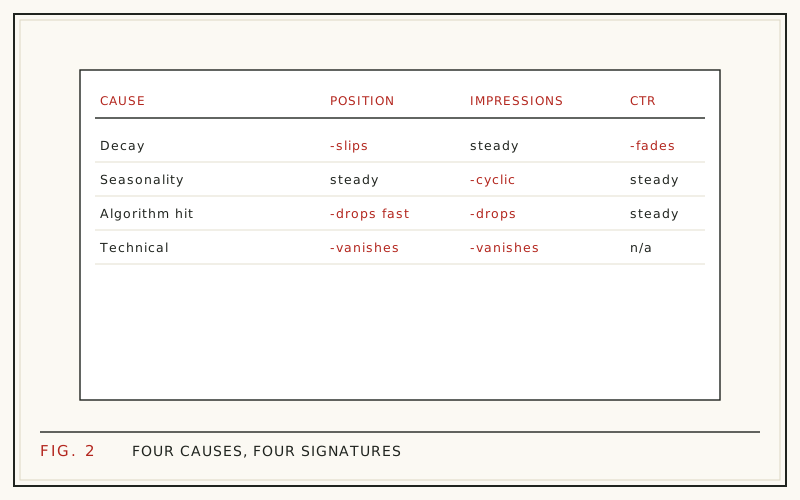
A blog traffic drop almost always traces back to one of five causes: a tracking problem, seasonality, a Google algorithm update, a technical fault, or content decay. The fastest way to find yours is to rule them out in that order, using Google Search Console as the source of truth rather than your analytics tool.
The order matters because each cause has a different fix, and a wrong diagnosis wastes months. Rewriting posts will not repair a broken redirect, and waiting out a supposed algorithm update will not reverse decay that compounds every month you delay.
This checklist walks through each cause, the specific signal that confirms or rules it out, and what to do once you have your answer.
Step 0: confirm the drop is real
Before diagnosing anything, verify the drop exists in Google Search Console, not just in your analytics platform. Open the Performance report, set a long date range, and look at clicks - not sessions. Analytics tools measure visits through JavaScript and cookies; Search Console reports Google's own click counts.
Then compare like with like: periods of equal length, the same mix of weekdays, and the same country and device filters if your audience skews one way. A comparison that pits a holiday week against a normal week is not evidence of a drop. It is evidence of a calendar.
Step 1: rule out a tracking problem
If analytics shows a cliff but Search Console shows steady clicks, your content is fine and your measurement is broken. Common culprits: a consent banner update that suppresses more visitors, a plugin or theme update that removed the analytics snippet, a tag migration that half-completed, or a growing share of ad blockers in your audience.
This check takes two minutes and saves entire wasted audits. Search Console clicks are the arbiter: if they held steady, stop diagnosing your content and start debugging your measurement. This step also sets the baseline for everything that follows, since every later check in this list reads Search Console numbers, not analytics sessions.
Step 2: check for seasonality
Compare the drop period with the same period last year. Search Console stores 16 months of data, enough for one clean year-over-year comparison. If clicks fell the same way last year and then recovered, you have a season, not a problem.
Educational sites dip in summer, B2B blogs dip in late December, and retail topics spike and crash around gift seasons. The tell is the repeating pattern at the same point in the calendar. Our decay vs seasonality guide covers the comparison method in depth, including the mixed case where both are happening at once.
Step 3: check for an algorithm update
Google confirms only a handful of updates each year - 4 in 2025, down from 7 in 2024 (Search Engine Land, 2025) - but each one can move a lot of traffic. Check whether your drop date lines up with a confirmed rollout, using an update history like Search Engine Land's.
The signature is timing plus breadth: a broad shift across many pages that begins within days of a confirmed rollout. If your drop is gradual, or confined to a few pages while the rest of the site holds, an update is unlikely to be your cause. Update losses are quality verdicts across a whole site, which is why the response is a broad content audit rather than a single-page fix.
Step 4: check for technical faults
Technical problems create cliffs, and Search Console's Pages report usually names them. Look for a spike in "Crawled - currently not indexed", pages newly "Excluded by noindex tag", or redirect errors clustered around your drop date.
The usual suspects after a redesign or migration: a stray noindex left on templates, broken canonical tags, a robots.txt rule blocking a directory, or redirect chains that shed link equity. If specific URLs vanished from the index entirely, the diagnosis is technical - and no amount of content work will fix it until the fault is repaired.
Step 5: sitewide or a handful of pages?
This is the fork in the road. Export page-level clicks for the drop period and the prior period, then sort by change. If nearly every page fell in the same week, think algorithm update or technical fault. If a handful of older posts have been sliding for months while newer ones hold steady, you are looking at content decay.
Decay is staggered and page-level - each post fades on its own schedule as its own SERP shifts and its own competitors update. Sitewide events are synchronized. The shape of the loss identifies the cause.
Step 6: which metric fell - impressions, position, or CTR?
Search Console splits the funnel for you, and each metric points somewhere different:
- Impressions fell, position steady -> search demand dropped, or you lost long-tail query visibility
- Position fell -> a ranking loss: competitors, an update, or decaying relevance
- CTR fell, position steady -> your snippet is losing the click to fresher-looking results
Position losses are expensive because clicks fall off steeply down the page: Backlinko's analysis of 4 million search results measured a 27.6% average CTR at position 1 against 2.0% at position 10 (Backlinko, 2025). A slide of two or three spots can cost half a page's clicks. Before panicking over the position metric itself, read what a dropping average position really means - it has quirks.
Step 7: did the SERP itself change?
Sometimes you did not fall - the page around you got busier. AI overviews, featured snippets, video carousels, and heavier ad load all push organic listings down and absorb clicks. SparkToro and Datos found that 58.5% of US Google searches ended without any click to the open web (SparkToro, 2024).
The signature: impressions steady, position steady, CTR down across many queries at once. Search your own target query in a private window and look at what now sits above you. Aging snippets make this squeeze worse - stale titles lose clicks even at stable positions.
The checklist in one table
Run the checks top to bottom; the first row that matches is usually your answer.
| Signal | Likely cause | Next step |
|---|---|---|
| Analytics down, Search Console steady | Tracking problem | Fix measurement, stop here |
| Same dip last year, then recovery | Seasonality | Wait it out; compare year over year |
| Broad shift on a confirmed update date | Algorithm update | Audit quality; avoid panic changes |
| Indexing errors, vanished URLs | Technical fault | Fix, then request reindexing |
| Gradual slide on specific pages | Content decay | Refresh the declining pages |
If it's decay: the fix is a refresh, not a rewrite
Decay is the most common diagnosis for an established blog, and the most fixable. The recovery move is a scoped refresh of each declining page: a current title and meta description, an intro that answers the query directly, an FAQ for the long tail, and honest date updates. The full process is in our refresh playbook.
Finding every declining page by hand is the slow part. The free RefreshRank plugin automates the detection step: it syncs your site's own Search Console history daily, compares 28-day windows across 16 months, and gives each page a 0-100 decay score so the biggest win-backs surface first. Detection runs free on one site - no card, no signup form - and every suggested change is a diff you approve before anything is published.
Questions
How much traffic fluctuation is normal?
Day-to-day and week-to-week swings are ordinary, driven by weekday mix, news cycles, and Google's constant SERP testing. That is why sound comparisons use 28-day windows rather than days or weeks: a window always holds four of each weekday, so routine rhythm cancels out. Investigate when a full window lands clearly below both the prior window and the same window last year.
My rankings look stable but clicks dropped. Why?
Your click-through rate fell. Either the SERP gained features that absorb clicks above you, or your snippet - title, description, visible date - looks stale next to fresher competitors. Check CTR per query in Search Console. If CTR fell while position held, refreshing the title and meta description is the targeted fix, not new content.
How long should I wait after an algorithm update before acting?
Wait until the rollout is confirmed complete before judging the damage, because rankings fluctuate while an update rolls out. Then assess page by page rather than sitewide. Do not mass-delete or panic-rewrite mid-rollout - you would be reacting to positions that have not settled yet, and you lose the ability to tell what the update actually did.
Can deleting old posts cause a traffic drop?
Yes, if the deleted posts had rankings, backlinks, or supported related pages, and no redirects were put in place. Deleted URLs return 404s, their link equity evaporates, and internal links pointing at them break. If you pruned content recently, compare your drop date against the deletion date before blaming anything else.
Is Google Analytics or Search Console more reliable for diagnosing drops?
Search Console, for organic search questions. It reports clicks measured by Google itself, unaffected by cookie consent, ad blockers, or tagging mistakes. Analytics answers a different question - what visitors did after arriving. For "did Google send fewer people to this page", Search Console is the ground truth.
What if several causes apply at once?
That is common - a seasonal dip can land on top of slow decay and make the drop look dramatic. Handle it in layers: use year-over-year comparison to strip out the seasonal share, check confirmed update dates for any sudden component, and treat whatever downward trend remains as decay. Each layer gets its own fix.
How do I find which specific pages are decaying?
In Search Console, compare page-level clicks for the last 28 days against the same window a year earlier, then sort by decline. Our step-by-step Search Console guide walks through the clicks, the exports, and the 16-month history limit that makes waiting costly.
Will traffic come back on its own?
It depends on the cause. Seasonal dips recover on schedule. Tracking problems recover the moment you fix them. Some update losses partially rebound in later updates. Decay does not self-correct - it reflects competitors and SERPs moving ahead of a static page, and the gap keeps widening until the page is updated.
Sources
- Search Engine Land - Google algorithm updates 2025 in review (2025)
- Backlinko - We Analyzed 4 Million Google Search Results (2025)
- SparkToro + Datos - 2024 Zero-Click Search Study (2024)