 RefreshRank
Adding Content Care to WordPress Maintenance Retainers
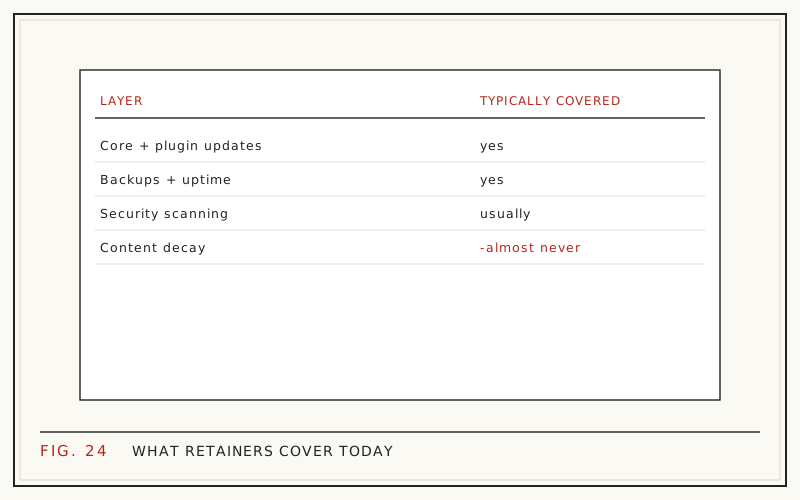
Most WordPress maintenance retainers cover plugin updates, core updates, backups, uptime monitoring, and security scans - and stop there. The content layer sits unwatched: pages that earned rankings two years ago quietly lose clicks while every box on the maintenance checklist stays green. A content-care add-on closes that gap, and it fits the retainer model agencies already run.
The add-on works because the shape of the problem matches the shape of the service: content decline is continuous, low-drama, and best handled in small monthly increments. This guide covers what content care includes, what to keep out of scope, a monthly cadence that fits billable hours, pricing structure, and how to pitch it to clients you already serve.
What do maintenance retainers usually cover?
The standard scope is infrastructure:
- Core, plugin, and theme updates
- Scheduled backups and restore testing
- Uptime and performance monitoring
- Security scans and malware cleanup
- A small allowance of support or fix time
All of it keeps the site running. None of it keeps the site earning. A site can pass every check on that list for two straight years while its organic traffic halves, because nothing in the scope ever looks at how individual pages perform in search. The client assumes someone is watching that layer; usually nobody is.
Content decay: the unwatched layer
Old content is usually the most valuable thing on a client's site. 76% of HubSpot's monthly blog views came from posts published in earlier months (HubSpot, 'Optimizing the Past', 2015 analysis). When those older pages fade, the loss is invisible day to day - rankings slip a position at a time, click-through erodes as titles age, and no alarm fires anywhere.
That slow fade has a name, content decay, and it behaves predictably enough to watch for. The mechanics are covered in what is content decay; the short version is that a page can be untouched, unbroken, and passing every technical check while it loses half its clicks.
Why decay is maintenance work, not a one-off project
Search does not hold still, so content cannot either. Google reports running 719,326 search quality tests in 2023, resulting in 4,781 launched changes (Google, 'How Search Works'). Competitors publish and update continuously. A page tuned perfectly in 2024 sits in a meaningfully different environment in 2026, through no fault of its own.
That is why a one-time content project starts aging the day it ships. Watching for decline and responding to it is recurring work with a monthly rhythm - which is exactly the shape of work a maintenance retainer already sells. The client already accepts paying monthly for prevention; content care extends the same logic from the server to the pages.
What a content-care add-on includes
Scope it as a short, repeatable list:
- A monthly decay check against the site's own Search Console data
- Title and meta description refreshes on flagged pages
- Reworked introductions on pages losing click-through or snippet position
- FAQ additions targeting real queries the page already appears for
- Honest date updates when the content genuinely changed
- A quarterly review of prune-and-redirect candidates
Each item is small, bounded, and finishable inside retainer hours, which is what makes the service deliverable month after month. The working method behind these tasks is in how to refresh old blog posts.
What to keep out of scope
The add-on stays profitable only if the boundaries hold:
- New article production - that is a content marketing engagement, priced separately.
- Full rewrites - if a page needs rebuilding from scratch, quote it as a project.
- Link building and digital PR - different skill, different budget.
- Design and conversion work - out of scope even when tempting.
Write these exclusions into the agreement, not just the proposal. The most common failure mode of content-care retainers is scope creep through 'while you are in there' requests that quietly turn a bounded service into unbilled consulting. A clear boundary also makes upsells cleaner: when a rewrite is genuinely needed, it becomes a quoted project instead of a favor.
A monthly cadence that fits retainer hours
| Week | Task |
|---|---|
| 1 | Pull 28-day windows, compare year over year, flag decliners |
| 2 | Refresh titles and metas on the two or three highest-potential pages |
| 3 | Update intros or add FAQs on one or two pages |
| 4 | Log changes with dates; write one paragraph for the report |
The cadence matters more than the volume. Two or three well-chosen pages a month, sustained for a year, works through the entire decaying tier of a typical small-business site. The logged dates are not bookkeeping - they become the before-and-after evidence the retainer renews on, because you can point at the exact week each page changed.
How should you price it?
Anchor to what clients already pay for search work. 78.2% of SEO providers charge monthly retainers, and the most common tier is $501-$1,000 a month, chosen by 20.4% of providers (Ahrefs SEO Pricing Survey, 2024). A content-care add-on naturally sits below a full SEO retainer, because the scope is narrower and the detection can be automated.
Price on scope, not hours: a fixed number of refreshed pages per month at a flat rate. Flat scope keeps your margin predictable, and it gives the client a concrete answer to 'what do I get' - a number of pages, a monthly report line, and comparisons they can check in their own Search Console.
Detecting decay without adding hours
Manual Search Console checks across a client roster are the part that does not scale - and the part software does well. The RefreshRank plugin syncs a site's own Search Console history daily, up to 16 months in 28-day windows, and gives every page a 0-100 decay score plus a win-back Potential that sorts the queue. Detection is free on one site, with no card and no signup form.
The drafting side stays under human control: proposed changes to titles, metas, intros, FAQs, and dates appear as current-vs-proposed diffs, and anything applied becomes a standard WordPress revision with one-click rollback. Nothing publishes on its own, which matters when the site belongs to a client. The plugin is on wordpress.org.
Reporting the content layer
Add one section to the existing monthly maintenance report: pages flagged, pages refreshed, and the before-and-after comparison once enough time has passed. Keep it to a paragraph and a small table - the maintenance report's virtue is brevity, and the content section should match it rather than balloon into a second report.
The comparison method is the same 28-day windowing used for detection: the window after the refresh against the window before it, with a few weeks of patience built in for recrawling. The mechanics, including what a genuine win looks like, are in measuring content refresh results.
Pitching the add-on to existing clients
The pitch is the client's own data. Open their Search Console property, find three pages that have visibly declined year over year, and show them. No industry statistics required - their own graph of their own page is the whole argument, and it cannot be dismissed as vendor math.
Timing matters because retainers get cut from the top down: 42% of agencies name budget cuts and economic pressure as the top reason clients leave (AgencyAnalytics, 2026 Marketing Agency Benchmarks). A line item that shows recovered traffic every month is harder to cancel than one that reports 'everything is still up'. Objection handling and framing are covered in pitching content decay work.
Questions
What is content care in a WordPress maintenance retainer?
A recurring service layer that watches how the site's pages perform in search and repairs decline as it appears: a monthly decay check against Search Console data, refreshed titles and metas, updated intros, added FAQs, and honest date updates. It sits alongside the technical scope - updates, backups, security - and covers the asset those tasks keep online but never look at.
How is content care different from a full SEO retainer?
Scope. A full SEO retainer typically includes strategy, new content, link building, and technical work. Content care only maintains what already exists: detecting decline and refreshing the affected pages. That narrower scope is why it prices below a full retainer and why it can be delivered predictably inside fixed monthly hours.
How many pages should we refresh per month?
Two to five for most small-business sites. The constraint is not effort but candidates: a 150-post blog only has so many pages worth refreshing at any moment, and refreshing the same pages repeatedly adds nothing. Let the decay queue set the pace - in a month where nothing qualifies, bank the time for the quarterly pruning review.
Can we just update the post dates each month?
No. A date change without a substantive change is fake freshness - Google's systems are built to discount it, and clients eventually notice too. Date updates are honest only when the content genuinely changed. The dividing line is covered in updating dates without faking freshness.
How do we find which client pages are decaying?
Compare the same 28-day window year over year in Google Search Console, per page, and flag the decliners - the walkthrough is in finding decaying content in Search Console. Done manually, this takes an hour or so per site each month, which is exactly why agencies automate the detection step across a roster.
How long until a refresh shows results?
Plan on four to eight weeks before the comparison means anything. Google has to recrawl the page, re-evaluate it, and gather enough impressions for click-through changes to show in the data. Set that expectation in the first report so a quiet first month reads as normal rather than as failure.
Does RefreshRank publish changes to client sites automatically?
No. Every proposed change appears as a current-vs-proposed diff that a human approves, and applied changes are standard WordPress revisions with one-click rollback. The product never auto-publishes, which is the property that makes it workable on sites you are accountable for but do not own.
Will maintenance clients actually pay for a content add-on?
The ones with declining pages will, once they see their own data - which is why the pitch starts with their Search Console graphs, not a rate card. Clients already paying for maintenance have accepted the retainer model, so the add-on extends an existing relationship rather than opening a new sale. Start with the two or three clients whose decline is steepest.
Sources
- HubSpot - Optimizing the Past (2015)
- Google - How Search Works: Rigorous Testing (2023)
- Ahrefs - SEO Pricing Survey (2024)
- AgencyAnalytics - 2026 Marketing Agency Benchmarks Report (2026)