 RefreshRank
How to Pitch Content Decay Work to Skeptical Clients
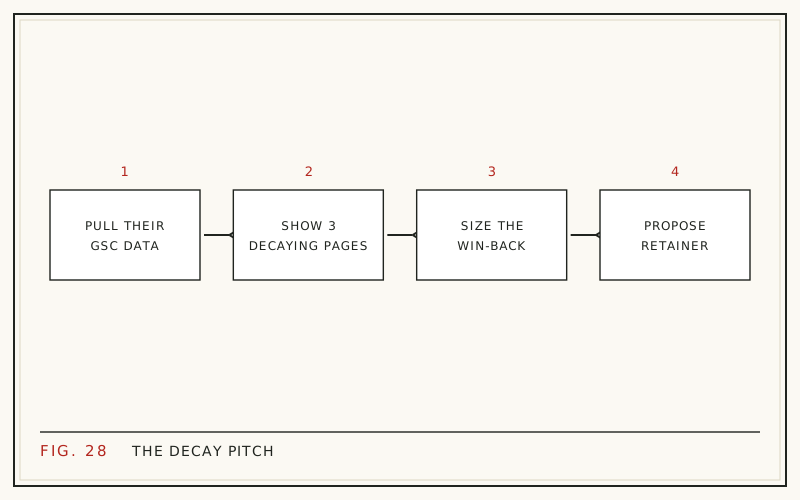
The most persuasive pitch for content decay work uses the client's own Google Search Console data, not your slide deck. Pull up three of their pages that earned steady clicks a year ago and are fading now, and the conversation shifts from 'why would we pay for updates' to 'how fast can we fix these'.
Skeptical clients are not being difficult. They have heard vague SEO promises before, and 'your content is decaying' can sound like one more scare tactic. The cure is specificity: make the decline visible in first-party data, size the recovery in clicks rather than jargon, and offer a first step that costs them nothing.
This post walks through that pitch end to end: the evidence to gather, the framing that works, and direct answers to the three objections you will hear most often.
Why content decay is a hard sell
Decay is invisible by design. No page breaks, no error fires, nothing looks different in the CMS. Traffic drifts down a few percent each month, and by the time anyone notices, the decline has been running for quarters.
That invisibility is the real obstacle, because people do not pay to fix problems they cannot see. So before you talk services, cadence, or price, your pitch has one job: make the decline visible on pages the client actually cares about, using data the client already trusts.
Open with their data, not your deck
Google Search Console is first-party evidence. It comes from Google, it covers the client's own site, and it is free, which removes the 'your tool is biased' objection before it can be raised.
Old content usually carries the load, which is exactly why its decline matters. HubSpot reported in its historical optimization analysis (2015, updated 2025) that 76% of its monthly blog views came from posts published in earlier months. When the back catalog fades, the whole site fades with it - slowly, then obviously.
If you have not run the comparison yourself, our walkthrough on finding decaying content in Search Console covers the exact steps, and it doubles as prep for the meeting.
The three screenshots that make the case
Keep the evidence tight. Three screenshots from the client's own Search Console do more work than a thirty-slide deck:
- A 28-day clicks comparison, this period against the same period last year, filtered to one important page that is clearly down.
- The queries report for that page, showing the terms it still ranks for but now earns fewer clicks on.
- The site-wide pages report sorted by click decline, proving the pattern goes beyond a single URL.
Annotate each screenshot with one plain sentence. 'This guide earns about half the clicks it did last spring' lands harder than any acronym you could put on a slide.
Size the win-back, not the loss
Losses make clients defensive; recoveries make them curious. Instead of 'you have lost a large share of your organic traffic', try 'these ten pages used to bring in significantly more clicks, most of them still rank on page one or two, and that is recoverable ground'.
A workable win-back estimate per page is simple: previous peak clicks minus current clicks, discounted by how far the page has slipped. A post that drifted from position 3 to position 8 is a far better bet than one that fell out of the top 100. Our guide to prioritizing content updates turns this into a scoring model you can run in a spreadsheet.
Offer a free audit as the first step
A free decay audit removes the last reason to say no. You are not asking for budget; you are asking for read access to Search Console and thirty minutes to present what you find.
Tooling makes the audit cheap to deliver. The RefreshRank plugin runs decay detection free on one site, forever - it syncs the site's own Search Console history daily, scores each page 0-100 for decay, and sorts the queue by win-back Potential. The audit largely builds itself, which frees you to focus on the story it tells.
Whatever tool you use, the deliverable is the same: a ranked list of fading pages with an estimated recovery for each. For structure, see what to hand clients in a content audit.
Objection one: 'Why not just publish new content?'
Because updating is usually the faster path to the same clicks. Ahrefs' 2023 ranking study of roughly two million URLs found that the average page ranking #1 is five years old, and 72.9% of top-10 pages are more than three years old. Search results favor established pages with history.
New pages also start from zero. The same Ahrefs study found only 1.74% of newly published pages reached the top 10 within a year. The client's aging posts already hold the age, links, and query history a new post would spend a year trying to earn. Updating protects an appreciating asset; replacing it restarts the clock.
Objection two: 'How do I know updates will work?'
You do not promise outcomes; you show precedent and commit to measurement. HubSpot's historical optimization program (2015, page updated 2025) reported that updating old posts lifted organic search views by an average of 106%. Present it as what happened on their site, not a guarantee for the client's - saying so plainly is what separates you from the pitches that made this client skeptical in the first place.
Then anchor the engagement to measurement. Every refreshed page gets a before window and an after window in Search Console, compared like for like, with the yardstick agreed before any work starts. Our post on measuring refresh results covers the method. Skeptics relax when they help choose the ruler.
Objection three: 'We already pay for SEO'
Most retainers are built around new content and links, not maintenance of what already ranks. The gap is real: a 2023 Semrush study that tracked 28,000 new domains for 13 months found only 4.2% kept at least one top-10 keyword for the entire period. Rankings churn constantly, and on most retainers nobody is assigned to defend them.
So position decay work as a complement, not a replacement. If another agency owns the client's SEO, propose the maintenance lane specifically - a productized refresh service can sit alongside a content retainer instead of competing with it.
The objection cheat sheet
Keep short versions ready for the room:
| Objection | Short answer |
|---|---|
| 'Traffic is down everywhere, it is the market' | Compare year over year in Search Console; decay shows per-page decline while seasonal dips recover on schedule |
| 'New content is a better investment' | Top results skew old; an update keeps the history and links a new page starts without |
| 'Prove it will work first' | Agree the measurement window up front and run a small pilot before any retainer |
| 'There is no budget this quarter' | Start with the free audit; the findings make next quarter's case for you |
Structure the offer: pilot first, retainer second
Close by asking for something small. A typical pilot: five pages, one month of work, results reviewed together after the next full 28-day window. Small commitments get approved without procurement fights, and a measured pilot converts itself into the retainer conversation.
The relationship math rewards patience. AgencyAnalytics' 2026 benchmarks survey of 494 agency professionals found that 62% of clients stay with their agency for two years or more. Win the pilot honestly, keep reporting wins in the client's own numbers, and the decay engagement becomes the least churn-prone line on the invoice. Our guide to proving SEO value with first-party data shows how to keep that trust compounding.
Questions
What is content decay?
Content decay is the gradual loss of search traffic to a page that once performed well. Rankings slip as competitors update, click-through falls as titles and dates age, and search intent shifts. It is normal rather than a penalty, and it is often recoverable with targeted updates. See our full explainer on what content decay is.
How do I show a client content decay without paid tools?
Use Google Search Console, which is free. Open the Performance report, compare the last 28 days against the same 28 days a year earlier, and sort pages by click decline. Screenshot the two or three most important losers. First-party Google data is harder to argue with than any third-party estimate.
Should the first decay audit be free?
Usually, yes. A free audit costs you little when detection is automated, and it converts skeptics because the findings come from their own data. Treat it as the qualifying step: if the audit surfaces meaningful win-back potential, the pilot proposal writes itself. If it does not, you have spent an hour, not a sales cycle.
How many pages should a pilot refresh cover?
Five to ten. That is enough that results do not hinge on a single URL, and small enough to finish inside a month. Pick pages with clear decline, remaining rankings on page one or two, and commercial relevance to the client, so a win is both measurable and meaningful.
How long until a refreshed page shows results?
Expect first movement within a few weeks of Google recrawling the page, and judge properly only after comparing full 28-day windows before and after. Some pages respond quickly, others take a couple of months, and a few will not respond at all. Set that expectation in the pitch, not after the invoice.
What if the client's traffic drop is seasonal, not decay?
Year-over-year comparison separates the two. A seasonal dip declines and recovers on roughly the same calendar schedule every year, while decay shows this period losing ground against the same period last year. Check before you pitch - calling seasonality 'decay' is the fastest way to validate a client's skepticism.
Can I promise a client specific ranking recoveries?
No, and you should say so unprompted. Search results move for reasons nobody fully controls, so honest pitches commit to process and measurement instead: agreed targets, before-and-after windows, and results reported either way. Clients who have been burned by guarantees tend to trust the person who refuses to make one.
Does content decay affect small sites too?
Yes, and often more sharply, because a handful of pages usually carries most of a small site's traffic. When one of those pages fades, the whole site feels it. That concentration is also the pitch: on a small site, refreshing three or four pages can move the entire traffic line.
Sources
- HubSpot - Optimizing the Past (2015, updated 2025)
- Ahrefs - How Long Does It Take to Rank in Google? (2023)
- Semrush - How Long Does It Take to Rank Higher on Google (2023)
- AgencyAnalytics - 2026 Marketing Agency Benchmarks Report (2026)