 RefreshRank
Managing Content Health Across Many Client Sites
Managing content health across many client sites comes down to three moves: automate the decay detection so no site depends on someone remembering to check it, keep one prioritized queue per site, and pool your refresh capacity instead of promising every client an identical monthly allotment. Checking Search Console property by property works at five clients and quietly fails at fifteen.
The failure is quiet because nothing visibly breaks. Every site stays online, every invoice goes out, and meanwhile the posts that earn most of each client's traffic slip a few positions per quarter with nobody watching. This guide lays out a system that keeps every site covered without adding headcount.
Why checking sites one by one stops scaling
The manual routine looks harmless: open a client's Search Console property, compare the last 28 days against the previous 28, scan the Pages report for declines, write down anything worrying, move on to the next property. Done properly, call it 20 minutes per site.
At five clients that is under two hours a month. At fifteen it is most of a workday. At twenty-five it becomes the first task cut in a busy week, and monitoring that only happens in slow weeks is not monitoring. The uncomfortable part is that ongoing attention is the product. Ahrefs' 2024 pricing survey of 439 SEO providers found 78.2% charge a monthly retainer, with the average retainer at $2,917 a month. Clients are paying, month after month, for someone to be watching.
The quiet cost: rotating neglect
When manual checks get skipped, they get skipped unevenly. The loudest client gets looked at weekly; the quiet ones go months. The quiet ones are usually the happy ones, which means neglect lands hardest on exactly the accounts most worth keeping.
Older content carries more weight than most clients realize. HubSpot's analysis of its own blog (first published 2015) found 76% of monthly blog views came from posts published in earlier months. This is the multi-site version of a familiar problem: the value sits concentrated in aging pages nobody re-reads. When those workhorse posts decay unwatched, the client loses traffic from the pages no one is thinking about, and the decline surfaces only when someone finally asks why leads are down.
What a multi-site system actually needs
Five capabilities separate a system that scales from a routine that decays along with the content:
- Detection that runs without you: each site's own Search Console data synced automatically, not pulled up when someone remembers
- A queue per site: that client's declining pages, ranked by what a fix could plausibly win back
- A view across sites: one place that answers which client needs attention this week
- Pooled capacity: refresh effort flows to the biggest opportunities, wherever they happen to be
- A paper trail: every change logged, so monthly reporting is an export rather than an archaeology project
Everything else - dashboards, alerts, scoring formulas - is implementation detail layered on top of these five.
One queue per site, one view across all
These sound like the same thing but serve different audiences. The per-site queue is for the client relationship: when you talk to a client, you talk about their pages, their queries, their priorities, with no other account visible anywhere. The cross-site view is for you: it is how Monday morning starts with a ranked answer to where this week's effort should go.
The ranking question is the same one a single-site owner faces, multiplied. Which declining pages have enough traffic history and enough remaining relevance to be worth the work? The scoring approach in how to prioritize content updates extends naturally: score pages within each site first, then compare the top of each site's queue against the others.
Pool the refresh capacity
Fixed per-client quotas feel fair and waste effort. One client's site may have nothing worth touching this month; forcing two updates onto it produces busywork that a sharp client will eventually notice. Another site may have five genuine win-back opportunities and only receives its allotted two.
Pool the capacity instead. Decide how many refreshes your team can do well per month in total, then spend them where the queues say the opportunity is. Fairness gets handled at the reporting layer: over a quarter, every client should see meaningful, documented attention on their site, even if the monthly line items were uneven. If a retainer contract promises a fixed count, scope it as a minimum, not a ceiling.
The one-license pattern
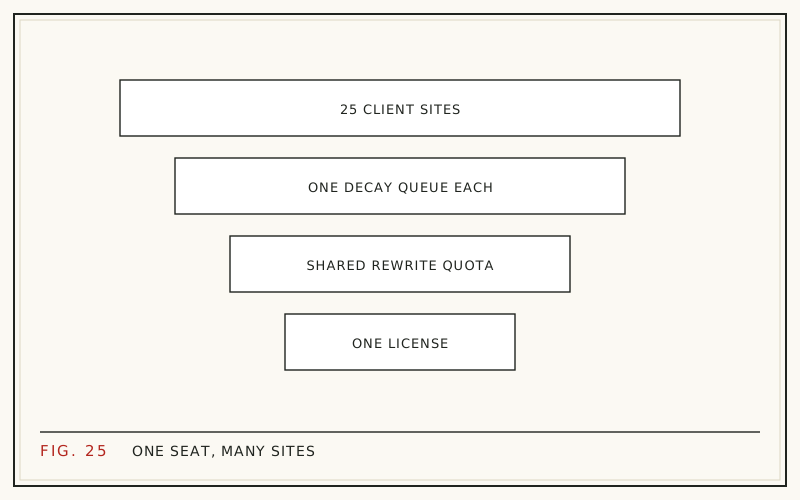
Tooling multiplies the problem when it is licensed per site: twenty sites means twenty subscriptions, twenty logins, twenty renewal dates, and twenty chances for a lapsed card to silently switch off monitoring. The pattern to look for is one license, many sites, shared quota.
This is how RefreshRank is built, for what it is worth. The plugin is free for decay detection on a single site: it syncs up to 16 months of the site's own Search Console history daily and ranks declining pages by win-back potential. Paid plans run one license across multiple client sites, each with its own queue, drawing AI-drafted refreshes from one shared monthly quota. Every draft is a current-versus-proposed diff a human approves, and applied changes land as ordinary WordPress revisions. Plan details live in the plans doc. Which tools belong in that workflow is its own question - see the content maintenance stack for a job-by-job breakdown.
A weekly cadence that holds at twenty sites
With detection automated, the human work compresses into a rhythm that fits inside a normal week:
| When | Task | Scope |
|---|---|---|
| Monday, 30 minutes | Scan queues, flag anything urgent | All sites |
| Midweek, one block | Work the top flagged items | 3-5 sites |
| Friday, 20 minutes | Log what shipped | Sites touched |
| Monthly | Deeper review and client summary | Each site |
The Monday scan is the part manual checking can never deliver at scale: a real answer, every week, across every site, in half an hour. The midweek block is where the pooled capacity gets spent, and the Friday log is what makes month-end reporting a ten-minute job instead of a reconstruction.
The retainer math
Multi-site efficiency is not just a workload question - it is margin. Every hour not spent on rotating manual checks is either capacity for another client or profit on the current ones, and the checking hours grow linearly with every site you add.
It also protects the number that matters most: retention. AgencyAnalytics' 2026 benchmarks survey of 494 agency professionals found 62% of agency clients stay two years or more. Content health work is well suited to earning those later years, because it produces a steady stream of small, concrete, reportable wins instead of one launch followed by silence. If your retainers currently stop at updates and backups, adding content care to maintenance retainers covers how to scope it in.
Keep clients in the loop without extra work
A system that catches decay across twenty sites still fails commercially if clients never hear about it. The fix is a lightweight monthly one-pager per client: what declined, what you refreshed, what recovered, and what is queued next.
Send it even in flat months. Silence is what makes clients wonder what they are paying for, and a short honest note in a quiet month costs ten minutes. Keep it plain and keep it short - reporting from Search Console covers which numbers belong in it, and white-label SEO reports covers making it presentable under your own brand without building anything.
Where to start this week
You do not need to redesign your operation to get out of the manual-checking trap:
- List every client site and confirm you actually have Search Console access to each - gaps here are common and invisible until you look
- Turn on automated decay detection for the three sites with the most organic traffic
- Set one total monthly refresh capacity and stop promising identical per-site counts
- Book the Monday half-hour scan as a recurring calendar block
Once the first three sites are flowing, adding the rest is administration, not a project. For the team-workflow side - who drafts, who approves, who ships - see scaling content updates with a small team.
Questions
How often should I check Search Console for each client site?
Monthly at minimum if you are checking manually, using a 28-day comparison against the prior period. The better answer is to automate the sync so the data is always current, then review a prioritized queue weekly. Manual monthly checks tend to slip once the client count passes a dozen.
Do I need a separate Search Console property for each client?
Yes. Each client site is its own property, and the clean setup is for the client to own the property and grant your agency user access. Avoid verifying client sites under a personal account you might lose, and never share logins between organizations - access changes should be one permission edit.
What is a content decay queue?
A list of a site's pages that are losing clicks or positions compared with their own history, ranked by how much traffic a fix could plausibly recover. The ranking matters more than the list: a queue sorted by win-back potential tells you what to work on first without re-analyzing anything.
Should every client get the same number of content updates per month?
No. Opportunity is uneven across sites, so identical monthly counts guarantee wasted effort somewhere. Pool your capacity and spend it where declines are largest and most recoverable, then use quarterly reporting to show each client the attention their site received across the period.
How many client sites can one person realistically monitor?
Manual checking caps out quickly, because every added site adds a fixed weekly cost that competes with billable work. With automated detection feeding one cross-site queue, monitoring stops being the constraint; the real limit becomes how many refreshes your team can execute well, which pooled capacity makes explicit.
What if a client site has no Search Console property yet?
Set one up before anything else: verify the domain, submit the sitemap, and have the client grant your agency access. Decay detection depends entirely on the site's own performance history, so the sooner the property exists, the sooner you have a trustworthy baseline to compare against.
How do I keep client data separate when managing sites in one tool?
Keep queues, quotas, and reports scoped per site, and check that any tool you use does the same. Clients should only ever see their own pages and numbers. Cross-site views are an internal planning instrument, not something that belongs anywhere in client-facing output.
What should a multi-site content report include?
Per client: the clicks trend over comparable 28-day windows, which pages were refreshed and why, any recoveries you can show, and what is queued next. Skip cross-client comparisons entirely. One page is enough - the goal is demonstrated attention, not volume.
Sources
- Ahrefs - SEO Pricing Survey (2024)
- HubSpot - Optimizing the Past (2015)
- AgencyAnalytics - 2026 Marketing Agency Benchmarks Report (2026)